


Quick Answer
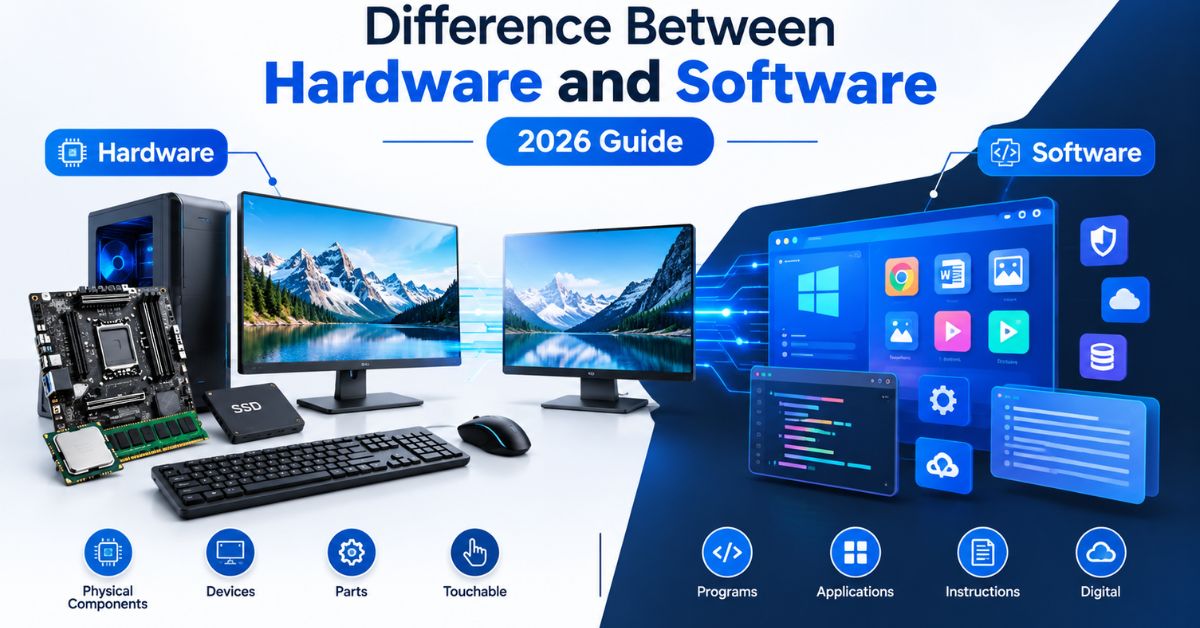
The difference between hardware and software is simple: hardware includes the physical parts of a computer or device, while software includes the programs and instructions that tell those parts what to do.
A CPU, keyboard, RAM, and monitor are hardware. Windows, Chrome, apps, and device drivers are software. Both work together to make modern devices useful.
Author Information
Author: Gulnaz Malik
Role: Founder, Publisher & Technology Content Specialist
Experience: 5+ Years in Technology, AI, Software & Digital Innovation
Content Review: All content follows Google’s latest EEAT guidelines and includes fact-checked information from official documentation, trusted technology sources, industry reports, and practical research to ensure accuracy, reliability, and up-to-date insights.
Introduction
Every computer, smartphone, tablet, gaming console, and smart device depends on hardware and software.
You interact with hardware when you touch a keyboard, move a mouse, look at a display, or connect a USB drive. You interact with software when you open an app, browse the web, edit a document, or change a system setting.
The difference between hardware and software becomes easier to understand when you look at how both parts work together. Hardware provides the physical foundation. Software provides the instructions.
For example, a laptop needs a processor to execute instructions. It also needs an operating system to manage the processor, memory, storage, and other components. Microsoft explains that an operating system manages apps, hardware, files, and security.
This guide explains hardware and software from beginner to advanced level. You will learn their definitions, types, differences, examples, relationship, maintenance needs, common mistakes, troubleshooting methods, and future trends.
Table of Contents
- What Is Hardware?
- Types of Hardware
- What Is Software?
- Types of Software
- Difference Between Hardware and Software
- How Hardware and Software Work Together
- Hardware vs Software: Real-World Examples
- Hardware and Software in Modern Technology
- Common Hardware and Software Problems
- Best Practices for Hardware and Software
- Common Misconceptions
- Hardware and Software: Cost, Lifespan, and Upgrades
- Latest Trends in Hardware and Software
- Key Takeaways
- Conclusion
- FAQs
- SEO Tags
- Internal Linking Suggestions
- Authoritative External References
- Social Media Title
What Is Hardware?
Hardware refers to the physical components of a computer or electronic device.
You can see and touch hardware. A laptop screen, keyboard, processor, motherboard, RAM, SSD, battery, camera, and speakers all qualify as hardware.
IBM describes computer hardware as components that support essential functions such as input, output, processing, and storage.
Hardware performs the physical work that makes computing possible.
For example, the CPU processes instructions. RAM temporarily holds data that active programs need. An SSD stores files and applications. A monitor displays visual information.
A device can contain many hardware components, and each component performs a specific job.
Hardware does not only exist inside computers. Smartphones, smart TVs, cars, routers, printers, game consoles, medical devices, and industrial machines also contain hardware.
Main Hardware Components
- CPU: Processes instructions and performs calculations.
- GPU: Handles graphics and parallel workloads.
- RAM: Stores data temporarily for active tasks.
- SSD or HDD: Stores applications, documents, media, and system files.
- Motherboard: Connects major components.
- Power supply: Provides electrical power to compatible components.
- Display: Shows visual output.
- Keyboard and mouse: Provide user input.
- Network adapter: Connects a device to a network.
- Speakers: Produce audio output.
Hardware also has physical limitations. A processor has a certain number of cores and a specific performance level. RAM has a fixed capacity. An SSD has a defined storage capacity and interface.
You can improve some hardware by upgrading components. For example, a compatible computer may support more RAM or a larger SSD.
Types of Hardware
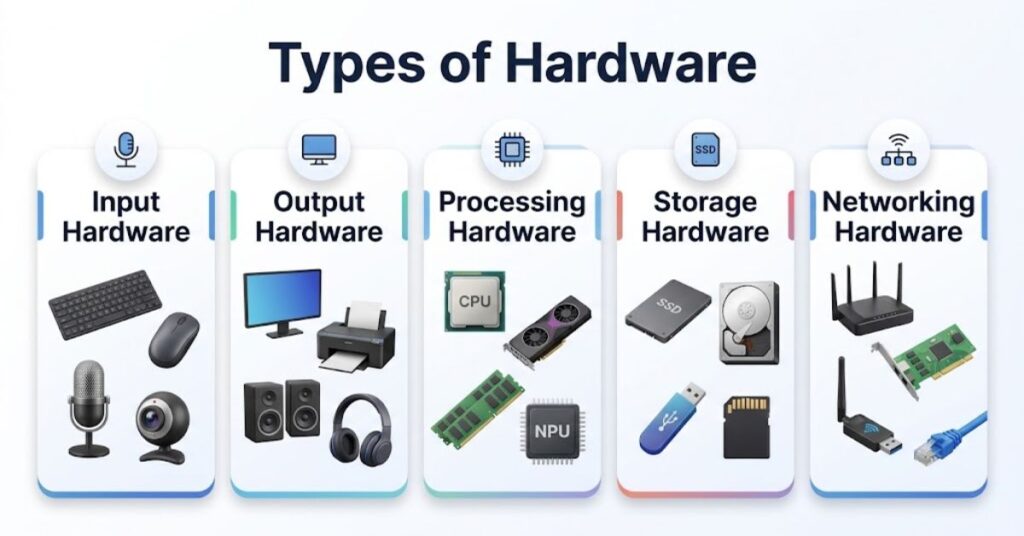
Hardware falls into several categories. Each category handles a different part of the computing process.
Input Hardware
- Keyboard: Sends typed characters and commands.
- Mouse: Controls the pointer and interface.
- Microphone: Captures audio.
- Webcam: Captures images and video.
- Scanner: Converts physical documents into digital information.
- Touchscreen: Accepts touch-based commands.
Output Hardware
- Monitor: Displays text, images, and video.
- Printer: Produces physical documents.
- Speakers: Produce sound.
- Headphones: Deliver private audio.
- Projector: Displays content on a larger surface.
Processing Hardware
- CPU: Handles general-purpose processing.
- GPU: Processes graphics and many parallel workloads.
- NPU: Accelerates certain artificial intelligence workloads on supported devices.
Storage Hardware
- SSD: Provides fast solid-state storage.
- HDD: Provides magnetic storage with high capacity.
- USB flash drive: Provides portable storage.
- Memory card: Stores data in phones, cameras, and other devices.
Networking Hardware
- Router: Connects networks and directs traffic.
- Network interface card: Provides network connectivity.
- Wi-Fi adapter: Provides wireless network access.
- Ethernet adapter: Provides wired network connectivity.
What Is Software?
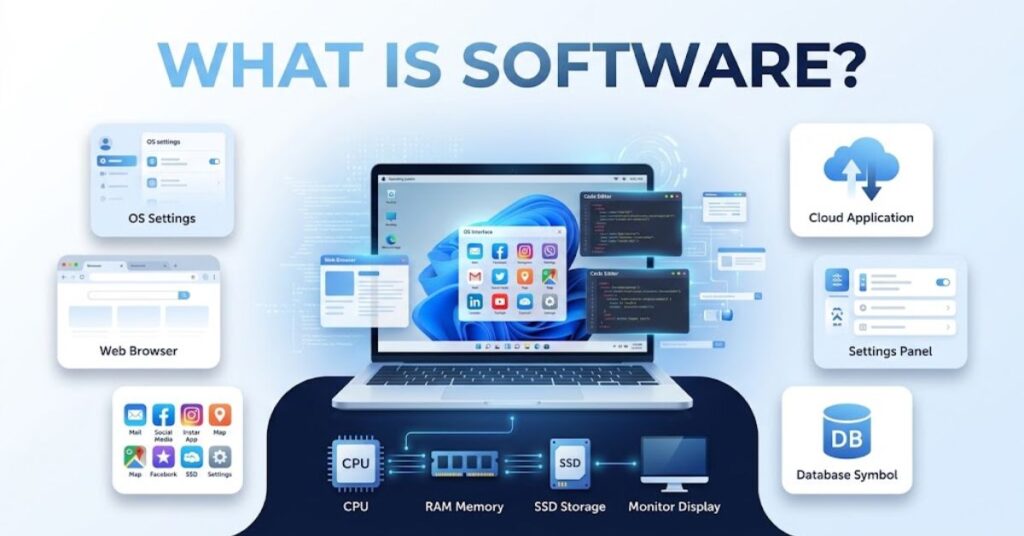
Software consists of programs, instructions, and related data that tell what to do.
You cannot physically touch software like you can touch a keyboard or processor. You interact with software through interfaces, commands, files, and applications.
IBM defines software as programs and instructions that enable the performance of specific operations.
Software controls many activities on a modern device.
When you open a browser, software tells the processor what operations to perform. When you save a document, software works with the operating system and storage system to write data to the drive.
Software also changes more easily than hardware. Developers can release updates that fix bugs, improve security, add features, or improve compatibility.
For example, you can update an application without replacing your phone’s processor or display.
Common Software Examples
- Windows
- macOS
- Linux
- Android
- iOS
- Google Chrome
- Microsoft Word
- Adobe Photoshop
- Video games
- Antivirus programs
- Cloud applications
- Database systems
- Device drivers
Software can run locally on a device or remotely through cloud infrastructure.
Types of Software
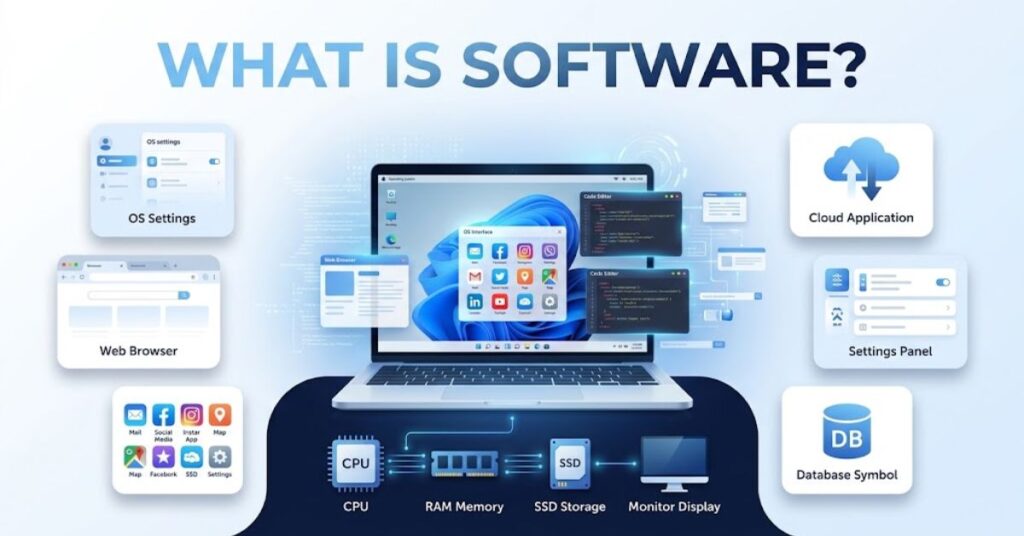
Software has several major categories. Each category serves a different purpose.
System Software
- Operating systems: Manage hardware and provide a platform for applications.
- Device drivers: Help operating systems communicate with hardware.
- System utilities: Help users maintain, configure, and monitor devices.
- Firmware: Provides low-level instructions for specific hardware.
- Compilers: Convert source code into executable forms.
Microsoft explains that a device driver acts as a software component that allows the operating system and a device to communicate.
Application Software
- Word processors
- Web browsers
- Email applications
- Photo editors
- Video editors
- Games
- Accounting applications
- Communication platforms
Application software directly helps users complete specific tasks.
Programming Software
Developers use programming software to create other software.
Common examples include:
- Code editors
- Integrated development environments
- Compilers
- Debuggers
- Version-control tools
- Testing frameworks
Middleware
Middleware connects applications, services, databases, and other software components.
Large organizations often use middleware in banking systems, e-commerce platforms, cloud services, and enterprise applications.
Difference Between Hardware and Software
The simplest difference between hardware and software relates to their nature.
Hardware represents physical components. Software represents instructions and programs.
The following table provides a quick comparison:
| Feature | Hardware | Software |
| Definition | Physical computer components | Programs and instructions |
| Physical? | Yes | No |
| Examples | CPU, RAM, SSD, monitor | Windows, Chrome, apps |
| Main role | Performs physical computing tasks | Provides instructions and logic |
| Can you touch it? | Yes | No |
| Changes | Usually require upgrades or replacement | Usually require updates or new versions |
| Failure | Physical damage or component faults | Bugs, corruption, malware, compatibility problems |
| Lifespan | Can wear out physically | Can become outdated or unsupported |
| Created by | Hardware engineers | Software developers |
| Maintenance | Cleaning, cooling, repairs, upgrades | Updates, backups, security, troubleshooting |
Software also differs in how users repair it.
If an SSD fails, you may need to replace the drive. If an application crashes, you may need to update, repair, reinstall, or reconfigure the application.
Neither category can replace the other. A computer needs physical components to execute instructions, while software gives those components useful tasks.
How Hardware and Software Work Together

Hardware and software do not operate as completely separate systems. They form one computing environment.
Consider a simple example. You open a video on your laptop.
First, you click the video using a mouse or touchpad. The input hardware sends information to the operating system.
The operating system processes that input and tells the browser what to do. The browser retrieves the video data and asks the hardware to decode and display it.
The CPU performs general processing. The GPU may handle graphics-related workloads. RAM holds active data. The SSD stores applications and cached information. The display produces the final visual output.
This process happens extremely quickly.
A simplified workflow looks like this:
- You provide input.
- Input hardware captures the action.
- The operating system receives the input.
- Software processes the request.
- The CPU and other components execute instructions.
- Storage or network hardware provides required data.
- Output hardware presents the result.
This relationship explains why hardware compatibility matters when you install software.
A demanding video editor may need sufficient RAM, CPU performance, GPU capability, and storage speed. A basic application may require much less.
Hardware vs Software: Real-World Examples
The difference becomes clearer when you compare complete devices.
| Device | Hardware | Software |
| Laptop | CPU, RAM, SSD, screen, keyboard | Windows, browser, apps |
| Smartphone | Processor, camera, display, battery | Android/iOS and mobile apps |
| Gaming PC | CPU, GPU, RAM, SSD, motherboard | Windows, games, drivers |
| Smart TV | Display, processor, speakers, network hardware | TV operating system and streaming apps |
| Router | Processor, antennas, ports, memory | Router firmware and management software |
| Printer | Print engine, sensors, memory, controller | Printer firmware and drivers |
| ATM | Card reader, display, keypad, cash mechanism | Operating system and banking software |
Example: Smartphone
A smartphone combines powerful hardware with many layers of software.
The processor handles computation. The camera captures images. The display presents information. The battery provides energy.
The operating system manages those components. Apps then use the operating system to access functions such as the camera, microphone, storage, and network.
Example: Gaming PC
A gaming computer shows the relationship even more clearly.
A powerful GPU can render complex graphics, but the game itself remains software. The operating system manages resources, while graphics drivers help the operating system and applications communicate with the GPU.
For readers interested in what interacts closely with PC hardware, our PhysX System Software guide provides a practical example.
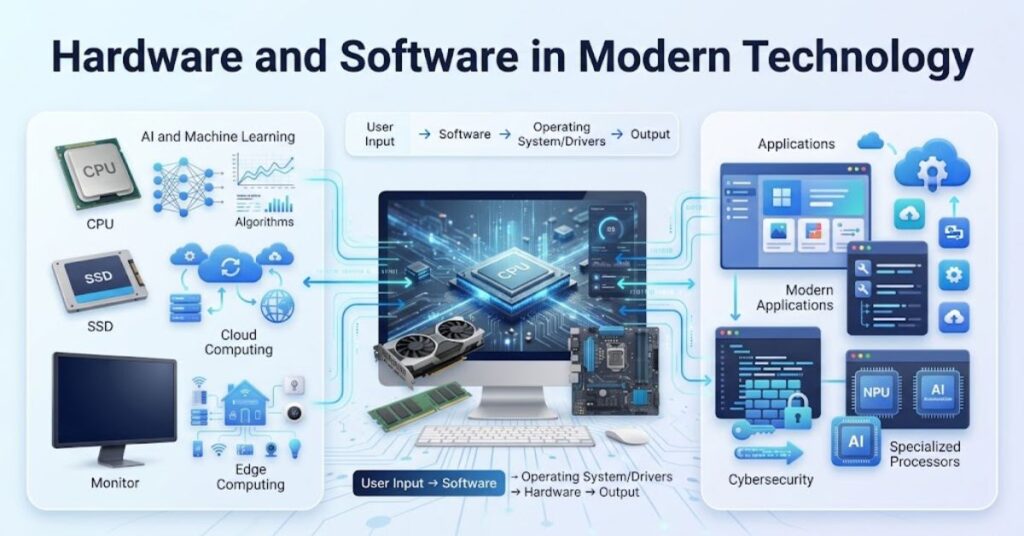
Hardware and Software in Modern Technology
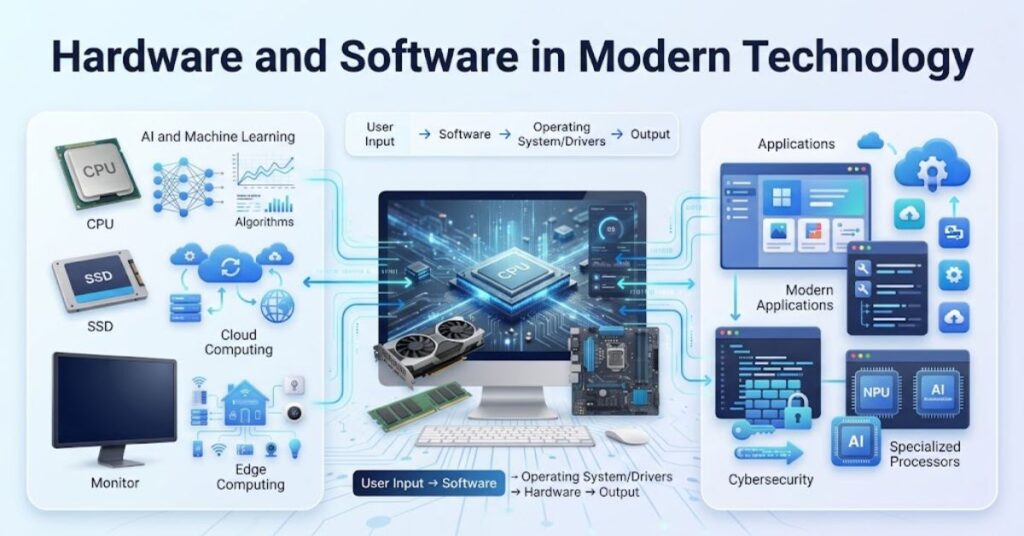
Modern technology increasingly combines specialized hardware with specialized software.
AI provides a strong example.
Modern computers can include CPUs, GPUs, and NPUs designed for different workloads. AI software can use these processors to accelerate tasks such as image processing, speech recognition, local AI assistants, and machine learning.
This trend makes the difference between hardware and software more connected than ever.
Cloud computing provides another example. A user may interact with software through a browser while the actual processing happens on remote servers.
In that situation, the user sees software on the screen, but data centers provide the physical servers, networking equipment, storage, and cooling systems behind the service.
Virtualization also shows how can represent hardware resources. A physical server can run multiple virtual machines, with software creating isolated computing environments.
Edge computing pushes some processing closer to users and devices. IoT devices combine sensors, processors, firmware, connectivity, and cloud software to collect and process data.
The result is a technology environment where software increasingly develop together.
For example, new AI software can create demand for specialized chips. New chips can then enable software developers to build more advanced applications.
Common Hardware and Software Problems
Many computer problems look similar at first. Understanding the difference between hardware and software can help you identify the correct solution.
Hardware Problems
Common hardware symptoms include:
- Device does not power on.
- Screen remains physically damaged.
- Computer overheats frequently.
- Storage drive disappears.
- RAM causes system instability.
- Fans make unusual noises.
- Ports stop detecting devices.
- Battery capacity drops significantly.
Microsoft notes that hardware errors involve malfunctions within hardware components and can range from recoverable conditions to serious failures.
Software Problems
Common software symptoms include:
- Applications crash.
- Windows shows repeated errors.
- Programs refuse to launch.
- Updates fail.
- Drivers conflict.
- Malware affects system behavior.
- Files become corrupted.
- Applications become incompatible after an update.
The correct troubleshooting method depends on the cause.
If the system crashes only after installing one application, investigate the software first.
If the computer fails to recognize a drive across multiple operating systems, investigate the hardware connection or drive itself.
Best Practices for Hardware and Software
Good maintenance can extend device usefulness and reduce unnecessary problems.
For hardware:
- Keep vents and fans clean.
- Avoid excessive heat.
- Use reliable power protection.
- Handle portable devices carefully.
- Monitor unusual noises and temperatures.
- Replace failing components early.
- Use compatible upgrades.
For software:
- Install updates from trusted sources.
- Keep security tools active.
- Back up important files.
- Remove unnecessary applications.
- Use strong passwords.
- Avoid unknown installers.
- Check compatibility before major upgrades.
Our Fan Controller RGB Software guide explains how these tools work and how they can help you control supported PC components.
Businesses should also maintain an inventory of both hardware. This approach helps IT teams track devices, licenses, updates, warranties, and security risks.
Common Misconceptions About Hardware and Software
Several common myths create confusion.
Myth 1: Hardware means only computer parts inside the case.
Not true. Keyboards, monitors, webcams, printers, speakers, routers, and other physical peripherals also qualify as hardware.
Myth 2: Software means only applications.
Software also includes operating systems, drivers, utilities, firmware, programming tools, and other instruction sets.
Myth 3: Hardware never changes.
Hardware changes through upgrades, replacements, repairs, and new generations of components.
Myth 4: Software does not need hardware.
needs computing hardware to execute. It cannot perform useful computation by itself.
Myth 5: Firmware is hardware.
Firmware is software stored in or closely associated with. It provides low-level instructions that help specific devices operate.
Myth 6: More powerful always solves software problems.
A faster processor cannot automatically fix a corrupted operating system, a broken application, a malware infection, or an incompatible driver.
Understanding these distinctions makes troubleshooting much easier.
Hardware and Software: Cost, Lifespan, and Upgrades
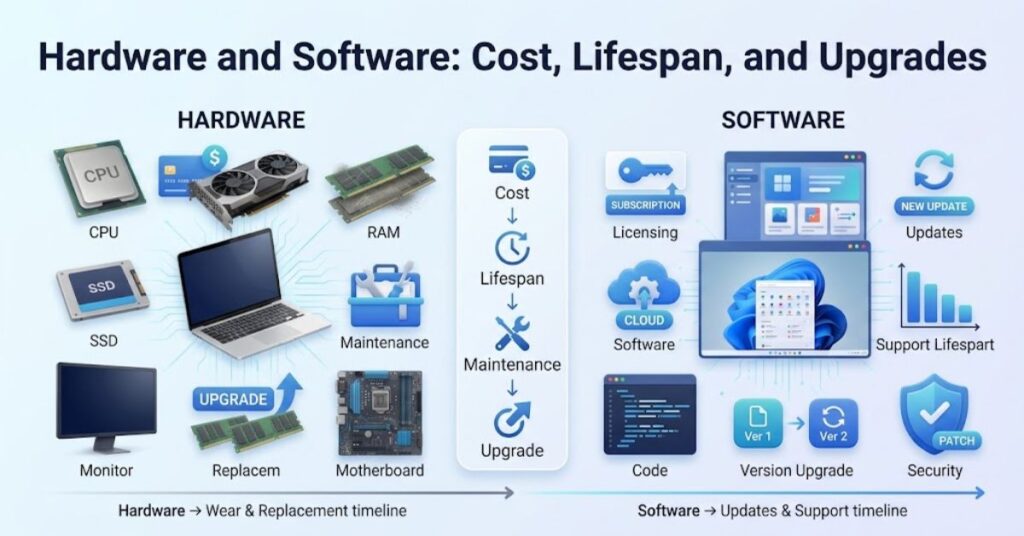
Hardware requires physical materials, manufacturing, transportation, testing, and installation. Upgrading hardware can therefore require a significant investment.
Software usually requires development, testing, infrastructure, licensing, and ongoing support. Developers can distribute software updates without physically replacing every device.
Hardware also experiences physical wear.
Fans accumulate dust. Batteries lose capacity. Storage devices can eventually fail. Displays can suffer physical damage.
Software does not wear out physically in the same way. However, software can become outdated. Developers may stop supporting older versions, or new operating systems may introduce compatibility issues.
A good maintenance strategy therefore treats both areas differently.
For software-related workplace tasks, you can also explore our Productivity Software guide to understand how applications support modern workflows.
For software maintenance, focus on updates, backups, security, compatibility, and proper configuration.
Latest Trends in Hardware and Software
Several trends continue to bring hardware and software closer together.
AI-Optimized Hardware
- NPUs accelerate supported AI workloads.
- GPUs handle highly parallel computing.
- CPUs continue improving general-purpose performance.
- AI PCs increasingly combine multiple processor types.
Software Intelligence
- AI assistants automate routine tasks.
- Applications increasingly include generative AI features.
- Developers use AI-assisted coding tools.
- Software can optimize hardware resource usage.
Cloud and Edge Computing
Cloud platforms move many workloads to centralized infrastructure.
Edge computing moves selected workloads closer to the data source. This can reduce latency for applications that need quick responses.
Specialized Computing
Technology companies continue developing hardware for specific workloads such as AI, graphics, networking, security, and scientific computing.
Embedded Technology
Cars, appliances, industrial machines, medical devices, and IoT products increasingly rely on embedded software.
This development means the traditional separation between “computer hardware” and “software” matters less in many modern systems. Engineers now design hardware as connected parts of one product.
Key Takeaways
- Hardware consists of physical components that you can touch.
- Software consists of programs, instructions, and related data.
- CPUs, RAM, SSDs, keyboards, and monitors represent hardware.
- Operating systems, browsers, games, and apps represent software.
- Drivers help operating systems communicate with hardware.
- Firmware provides low-level software instructions for specific hardware.
- Hardware can physically wear out or fail.
- Software can become outdated, corrupted, incompatible, or compromised.
- Hardware and software depend on each other for useful computing.
- Modern AI, cloud, edge, and IoT systems increasingly combine specialized hardware and software.
- Good maintenance requires different strategies for hardware and software.
Conclusion
The difference between hardware and software becomes simple once you understand their roles.
Hardware provides the physical components. Software provides the instructions.
A CPU needs instructions to process useful tasks. An operating system needs hardware to execute its code. Applications need both the operating system and physical resources to function.
This relationship appears in almost every modern technology product. Your laptop, smartphone, gaming console, router, smart TV, and car all combine hardware and software.
The distinction also helps with troubleshooting. Physical symptoms often point to hardware problems, while crashes, configuration errors, compatibility issues, and corrupted applications often point to software problems.
As AI, cloud computing, edge computing, and connected devices continue to grow, hardware and software will become even more closely integrated.
Understanding both gives students, professionals, business owners, and everyday users a stronger foundation for making technology decisions.
FAQs
What is the main difference between hardware and software?
Hardware consists of physical components, while software consists of programs and instructions that tell hardware what to do.
Is a keyboard hardware or software?
A keyboard is hardware because it is a physical input device that you can touch and use.
Is Windows hardware or software?
Windows is software. It is an operating system that manages computer hardware and provides a platform for applications.
Can hardware work without software?
Hardware can power on or perform limited built-in functions, but a general-purpose computer needs software to perform useful computing tasks.
Can software work without hardware?
No. Software requires computing hardware to store, execute, process, and display its instructions and results.
What is firmware?
Firmware is specialized software that provides low-level instructions for hardware devices such as routers, printers, and embedded systems.
Which lasts longer, hardware or software?
Hardware can physically wear out, while software can remain usable for years but may become outdated or unsupported.
Is a driver hardware or software?
A driver is software that helps an operating system communicate with a hardware device.
Why do hardware and software need each other?
Hardware performs physical computing operations, while software provides the instructions and logic that make those operations useful.
SEO Tags
- Difference Between Hardware and Software
- hardware vs software
- hardware and software
- computer hardware
- computer software
- types of hardware
- types of software
- hardware examples
- software examples
- hardware software difference
Internal Linking Suggestions with Anchor Text
- PhysX System Software — Use when discussing software that interacts with PC hardware.
- Fan Controller RGB Software — Use when explaining software-based hardware control.
- Productivity Software — Use when discussing application software and workplace tools.
- Samsung Galaxy J7 Update Software — Use when discussing software updates on mobile hardware.
- AI Latest News 2026 — Use when discussing the growing relationship between AI software and specialized hardware.
Authoritative External References
Social Media Title
Difference Between Hardware and Software: Complete 2026 Guide