

Quick Answer:
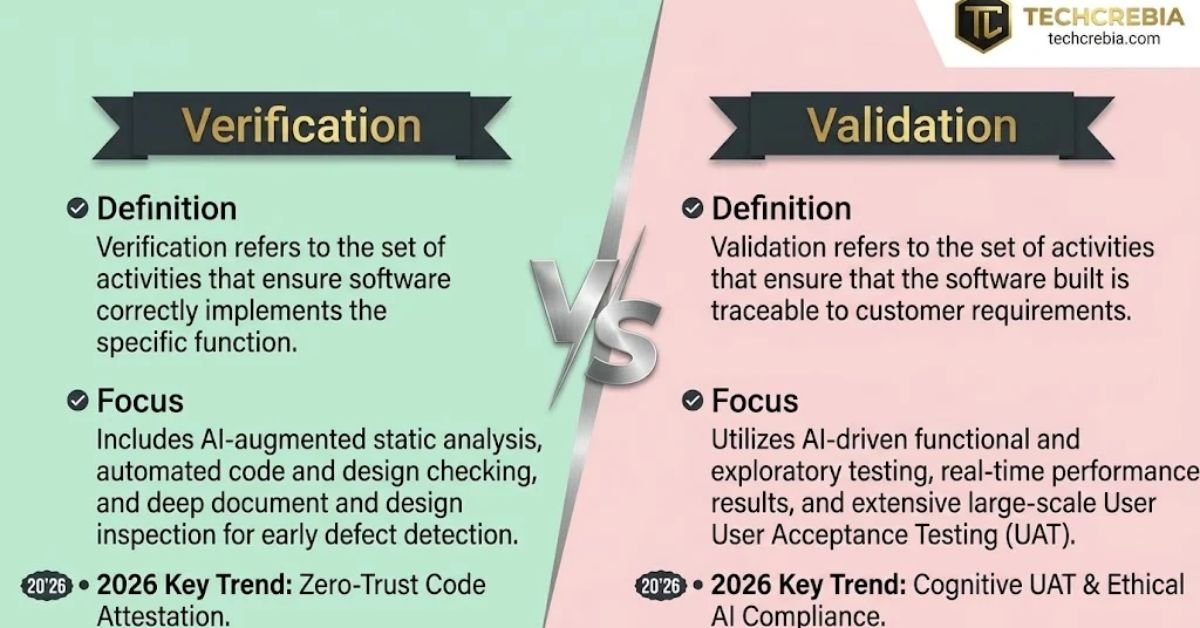
Software verification and validation are two essential software quality practices. Verification checks whether developers build software according to its specifications.
Validation checks whether the finished software meets user needs and solves the intended problem.
Verification often includes code reviews, inspections, and requirement checks, while validation commonly includes functional testing, usability testing, and user acceptance testing. Both practices help teams identify defects and deliver reliable software.
Author Information
- Author: Gulnaz Malik
- Role: Founder, Publisher & Technology Content Specialist
- Experience: 5+ Years in Technology, AI, Software & Digital Innovation
- Content Review: This article draws on official technical guidance and established software engineering practices to explain the topic accurately and clearly.
Introduction
Software teams must do more than write code that runs. They must also ensure that their products follow technical requirements, solve real problems, protect data, and provide a useful experience for customers. Software verification and validation help teams achieve these goals.
Imagine a company developing an online shopping website. The developers build a checkout page that calculates product prices and applies discount codes.
The calculations work exactly as specified, but customers cannot understand how to complete their purchases. The team may have verified the implementation correctly, yet the website still fails to meet customer needs.
This example highlights the difference between verification and validation. Verification checks whether a product meets its specified requirements. Validation checks whether that product serves its intended purpose.
Both activities support software quality assurance, but they answer different questions. This guide explains their meanings, differences, methods, practical examples, benefits, common mistakes, and emerging trends.
It also shows how development teams can combine both practices throughout the software development life cycle.
Table of Contents
- What Is Software Verification and Validation?
- What Is Software Verification?
- What Is Software Validation?
- Software Verification vs. Validation: Key Differences
- Common Software Verification and Validation Methods
- How Verification and Validation Work in the SDLC
- Real-World Examples of Software Verification and Validation
- Benefits of Software Verification and Validation
- Common Challenges and Mistakes
- Best Practices for Effective Software V&V
- Latest Software Verification and Validation Trends in 2026
- Key Takeaways
- Conclusion
- Frequently Asked Questions
What Is Software Verification and Validation?
Software verification and validation, often shortened to V&V, refers to two complementary sets of activities that help teams assess software quality.
Verification examines whether software work products meet their specified requirements. Validation examines whether the software meets its intended purpose and the needs of its users.
NASA’s software engineering guidance describes verification as building the product correctly and validation as building the right product. You can explore its official software verification and validation overview for further context.
These activities apply throughout software development. Teams can review requirements before coding, inspect designs, test individual components, and evaluate the integrated product before release.
Why do software teams need both?

A software product can pass technical checks and still disappoint its users. It can also appear useful during a demonstration while containing defects that violate its requirements.
Consider a banking application:
- Verification: The application calculates interest according to the approved formula and follows the documented transaction rules.
- Validation: Customers can understand their balances, complete transfers easily, and use the application for their intended banking tasks.
Verification helps establish technical correctness. Validation helps establish suitability for actual use.
Neither activity replaces the other. Together, they give development teams a more complete view of software quality.
What Is Software Verification?
Software verification is the process of checking whether software components, documents, designs, and other development outputs conform to specified requirements.
In simple terms, verification asks: Are we building the product correctly?
Teams use verification to identify inconsistencies, incorrect implementations, missing requirements, and design defects. They can perform many verification activities before the software reaches a complete, runnable state.
For example, a developer building a password reset feature might review the code to confirm that it follows the approved security rules. A tester might then check whether the application rejects malformed reset requests according to its specifications.
Main objectives of software verification
Software verification aims to:
- Confirm that the team follows approved requirements and design specifications.
- Identify errors before they reach production.
- Check whether code implements the intended logic.
- Detect inconsistencies between requirements, design documents, and implementation.
- Reduce the cost and effort of correcting defects later.
- Produce evidence that supports software quality decisions.
Common software verification activities
- Requirement reviews: Check requirements for clarity, completeness, and consistency.
- Design inspections: Examine system architecture and component designs.
- Code reviews: Ask developers or reviewers to examine code for defects and standards violations.
- Static analysis: Use tools to inspect code without executing it.
- Unit testing: Check individual functions or components against defined expectations.
- Interface checks: Confirm that components exchange data according to specifications.
For instance, a shopping website might require a discount code to reduce an eligible order by 10%. Verification checks whether the implementation applies that rule correctly, including the specified rounding and eligibility conditions.
Verification does not always require a running application. Teams can review requirements, designs, and source code before execution. This approach helps them catch defects early.
What Is Software Validation?
Software validation is the process of evaluating whether software meets its intended purpose and satisfies user and stakeholder needs.
In simple terms, validation asks: Are we building the right product?
A product may meet every documented technical requirement but still fail to solve the customer’s problem. Validation helps teams discover this gap before or after release, depending on the project and the activity involved.
For example, a company might develop a mobile banking application with every feature listed in its requirements document. However, if customers struggle to transfer money or understand transaction statuses, the team needs to investigate whether the application meets their actual needs.
Main objectives of software validation
Software validation aims to:
- Confirm that the product supports its intended use.
- Check whether users can complete important tasks.
- Evaluate usability, performance, and functional behavior in realistic conditions.
- Identify gaps between business goals and the delivered product.
- Gather feedback from customers and stakeholders.
- Confirm that the software provides practical value.
Common software validation activities
- Functional testing: Check whether features behave as users expect.
- System testing: Evaluate the complete integrated application.
- Usability testing: Observe whether users can complete tasks easily.
- User acceptance testing (UAT): Ask business representatives or intended users to assess whether the product meets acceptance criteria.
- Beta testing: Collect feedback from selected users in realistic environments.
- Operational testing: Assess whether the application works appropriately under expected operating conditions.
For example, a team might ask customers to complete a purchase using a new checkout system. Testers observe whether customers can find products, enter delivery details, choose a payment method, and understand the confirmation screen.
The team can use this feedback to improve the product, even when its underlying code passes technical checks.
Validation does not mean that every user must like every feature. Instead, it provides evidence that the product satisfies defined needs, intended uses, and acceptance criteria.
Software Verification vs. Validation: Key Differences
Software verification and validation share the goal of improving quality, but they focus on different aspects of a product. Verification emphasizes conformance to specifications, while validation emphasizes suitability for intended use.
The following comparison table summarizes the main differences.
| Comparison factor | Software verification | Software validation |
| Main question | Are we building the product correctly? | Are we building the right product? |
| Primary focus | Requirements, design, and implementation | User needs and intended use |
| Main objective | Confirm conformance to specifications | Confirm suitability for use |
| Common methods | Reviews, inspections, static analysis, unit tests | System tests, usability tests, UAT |
| Typical participants | Developers, reviewers, QA engineers | QA engineers, users, clients, stakeholders |
| Timing | Throughout development | Throughout development, integration, and release preparation |
| Test environment | May use documents, code tools, or controlled test environments | Often uses realistic workflows and representative environments |
| Main evidence | Review findings, analysis reports, test results | Acceptance results, user feedback, scenario outcomes |
| Example | Confirm a discount calculation follows its specification | Confirm customers can complete purchases successfully |
| Key risk addressed | Incorrect implementation | Product that fails to meet user needs |
Software verification and validation examples
Consider an online booking platform. The business requires the system to display available appointment times and prevent double bookings.
During verification, the team checks whether the booking logic follows the approved requirements. It inspects the database rules, reviews the code, and tests whether two requests can reserve the same slot.
During validation, the team asks representative users to book appointments. It checks whether they can find available times, understand the booking process, and receive useful confirmation messages.
Both activities matter. Correct booking logic cannot compensate for a confusing interface, and an attractive interface cannot compensate for a system that creates duplicate appointments.
Are verification and validation the same as software testing?
No. Software testing is one method that teams can use during verification and validation. Both processes can also involve inspections, reviews, analysis, demonstrations, and other forms of evidence.
A code review, for example, can reveal a defect without executing the application. A user acceptance test can reveal that a feature fails to meet a business need.
NASA’s software engineering requirements and guidance discuss verification and validation as planned activities across the software life cycle.
Common Software Verification and Validation Methods
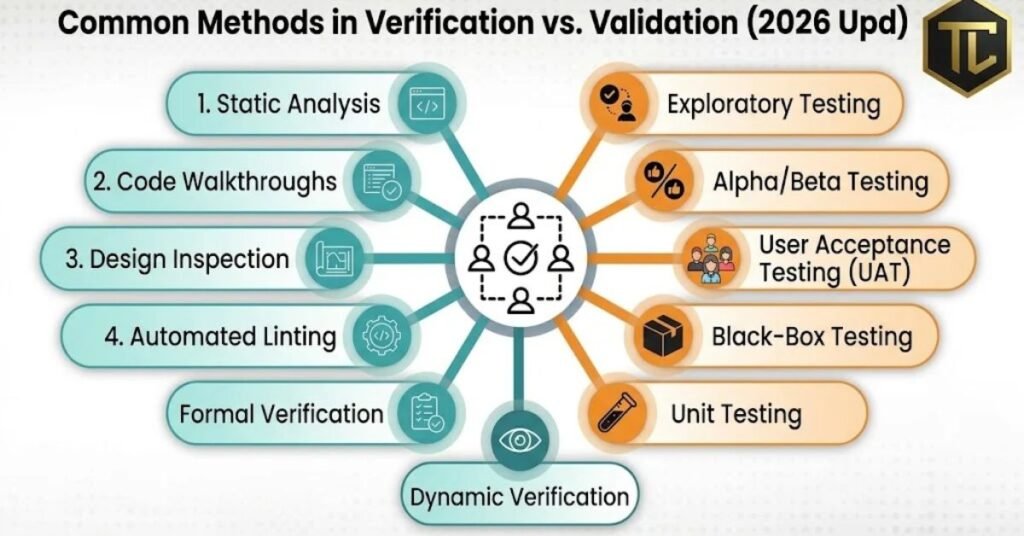
Teams should select methods according to the product’s complexity, risks, requirements, and intended users. A simple website may need lightweight reviews and automated tests, while safety-critical software requires much more rigorous evidence.
Software verification methods
- Reviews and inspections: Examine requirements, architecture, designs, and source code to find inconsistencies.
- Static code analysis: Detect potential bugs, security weaknesses, coding standard violations, and other issues without running the program.
- Unit testing: Test individual functions and components with expected inputs and outputs.
- Interface testing: Confirm that connected components exchange information correctly.
- Requirements traceability: Map each requirement to relevant design elements, implementation work, and verification evidence.
- Formal methods: Use mathematical models or proofs to assess whether critical properties hold.
For example, a payment system may use static analysis to identify unsafe coding patterns and unit tests to confirm how it handles valid, invalid, and boundary-value transactions.
Software validation methods
- System testing: Assess the complete application against end-to-end requirements and scenarios.
- Acceptance testing: Confirm whether the product meets agreed business and user acceptance criteria.
- Usability testing: Observe how people interact with the interface and identify points of confusion.
- Performance testing: Evaluate response times, throughput, and stability under representative workloads.
- Compatibility testing: Check whether the application works across supported browsers, devices, and operating systems.
- Field or beta testing: Gather evidence from realistic usage before a wider rollout.
For example, a video conferencing application may pass its individual component tests but still struggle during a large meeting. System and performance tests can reveal integration or capacity problems before customers encounter them.
Choosing the right method
| Situation | Useful approach |
| Requirements contain contradictions | Requirements review |
| Code may contain unsafe patterns | Static analysis and code review |
| A calculation produces incorrect results | Unit and boundary-value testing |
| Several services must work together | Integration and system testing |
| Users struggle with navigation | Usability testing |
| A business must approve a new workflow | User acceptance testing |
| A system must handle heavy traffic | Load and stress testing |
Teams should avoid relying on one test type to establish overall quality. Different methods expose different classes of defects.
How Verification and Validation Work in the SDLC
The software development life cycle (SDLC) provides a structured way to plan, build, test, release, and maintain applications. Verification and validation should support the entire process rather than appear only at the end.
1. Requirements gathering
The team identifies business goals, user needs, system behavior, security expectations, and acceptance criteria.
Verification checks whether requirements are clear, consistent, measurable, and complete. Validation checks whether they represent the problem that stakeholders actually need to solve.
2. Software design
Developers plan the architecture, data structures, interfaces, and component relationships.
Verification reviews the design against approved requirements. Validation considers whether the proposed design can support the intended workflows and operating environment.
3. Development and coding
Developers implement the software and perform code reviews, static analysis, and unit testing.
These activities help identify defects before components reach broader integration testing. Developers should also document important design decisions and keep tests aligned with changing requirements.
4. Integration and system testing
The team combines components and evaluates their interactions.
Verification checks whether interfaces, calculations, data flows, and system behavior match specifications. Validation checks whether the integrated product supports realistic user scenarios and intended workflows.
5. Acceptance and release
The team evaluates release readiness against agreed criteria. Business representatives or customers may perform acceptance tests, while engineers review unresolved defects, security concerns, and operational risks.
A successful test run does not automatically mean the product is ready. Teams must also consider defect severity, test coverage, known limitations, and the consequences of failure.
6. Maintenance and updates
After release, teams monitor issues, fix defects, and introduce new features. Each significant change can affect existing functionality.
Regression tests help verify that previous behavior still works. Validation checks whether updated workflows continue to meet user needs.
A well-planned V&V process therefore continues throughout the product’s life, including major upgrades and maintenance releases.
Real-World Examples of Software Verification and Validation
Practical examples make the difference between verification and validation easier to understand. The exact tests depend on the application’s requirements and risks.
Example 1: E-commerce website
An online store needs a reliable checkout process.
Verification activities:
- Check that product prices and discounts follow the approved rules.
- Confirm that the application validates required checkout fields.
- Test that payment requests follow the specified processing logic.
- Review error handling for failed transactions.
Validation activities:
- Ask users to complete a purchase from start to finish.
- Check whether customers understand delivery and payment options.
- Confirm that order confirmations provide the information customers need.
- Evaluate whether the checkout experience supports the business goal of completing purchases.
Example 2: Healthcare software
A healthcare application stores patient information and helps staff manage appointments.
Verification checks whether access controls, data handling, and scheduling rules meet approved requirements. Validation evaluates whether healthcare staff can use the application correctly in their actual workflows.
A defect in either area can create serious problems. The team should therefore use risk-based testing, protect patient information, and maintain appropriate evidence of test results.
Example 3: Mobile banking application
A banking app must support secure account access and accurate transfers.
Verification checks transaction calculations, authentication rules, and required error handling. Validation checks whether customers can complete transfers, understand confirmation messages, and recover from common problems.
The team should also test interrupted connections, duplicate requests, and unusual transaction conditions.
Example 4: Productivity software
A team developing task management software may verify that reminders trigger at the specified time and that task changes save correctly. Validation checks whether users can organize their work and manage deadlines without unnecessary confusion.
This distinction also applies when evaluating existing productivity software: technical features matter, but their usefulness depends on how well they support the user’s workflow.
Benefits of Software Verification and Validation
A structured V&V process helps teams improve quality, manage risk, and make better release decisions.
- Earlier defect detection: Reviews and automated checks can identify problems before they spread across the system.
- Lower rework costs: Early findings often require fewer changes than defects discovered after release.
- Better reliability: Consistent testing helps teams identify incorrect behavior and unstable integrations.
- Improved user satisfaction: Validation checks whether the product meets real needs instead of relying only on technical assumptions.
- Stronger security: Appropriate verification and security testing can uncover weaknesses before attackers exploit them.
- Clearer project decisions: Test evidence gives teams a stronger basis for deciding whether to fix, delay, or release a product.
- Better maintainability: Documented requirements, test cases, and traceability help future developers understand the system.
These benefits depend on the quality of the process. A team that writes weak requirements or ignores failed tests will not gain much from simply increasing its test count.
Common Challenges and Mistakes
Even experienced teams can struggle to implement verification and validation effectively.
- Treating both activities as identical: Teams may focus on passing technical tests while overlooking user needs. Define separate objectives and acceptance criteria for each.
- Starting testing too late: Late testing leaves less time to fix major defects. Review requirements and designs early.
- Writing vague requirements: Statements such as “the application should be fast” are difficult to verify. Define measurable response-time targets and relevant workloads.
- Ignoring user feedback: Developers may assume they understand customer needs. Include representative users or stakeholders in validation activities.
- Relying only on automated tests: Automation handles repeatable checks well, but human reviews and usability testing reveal other problems.
- Skipping regression tests: A small code change can break an existing feature. Run relevant regression tests after changes.
- Ignoring unusual scenarios: Test invalid inputs, network interruptions, permission errors, and boundary conditions.
- Keeping weak documentation: Without clear test records and requirement links, teams struggle to explain what they checked and what remains unresolved.
One common mistake deserves special attention: a successful test result does not prove that software has no defects. It only provides evidence about the conditions and behaviors that the team evaluated.
Best Practices for Effective Software Verification and Validation
Teams can make V&V more useful by connecting every activity to a defined quality objective.
- Define measurable requirements. Write requirements that describe observable behavior and clear acceptance conditions.
- Plan verification and validation separately. Identify what each activity must establish, who will perform it, and what evidence the team needs.
- Start early. Review requirements and design documents before implementation becomes expensive to change.
- Use risk-based testing. Give more attention to security, financial calculations, privacy, and safety-critical functions.
- Automate repeatable checks. Integrate unit tests, static analysis, and regression tests into continuous integration where practical.
- Include realistic user scenarios. Test complete workflows rather than evaluating features only in isolation.
- Maintain requirements traceability. Connect requirements to test cases, results, and known defects.
- Set clear release criteria. Decide how the team will handle critical defects, incomplete tests, and accepted risks before release day.
- Review results and improve. Use defect reports, customer feedback, and production incidents to improve future testing.
For example, a small software team can begin with requirement reviews, code reviews, unit tests, a few end-to-end scenarios, and user acceptance checks. A larger or higher-risk project may need independent reviews, more extensive automation, formal analysis, and documented approval processes.
The best approach depends on the product. Teams should select methods that provide credible evidence without adding unnecessary complexity.
Latest Software Verification and Validation Trends in 2026
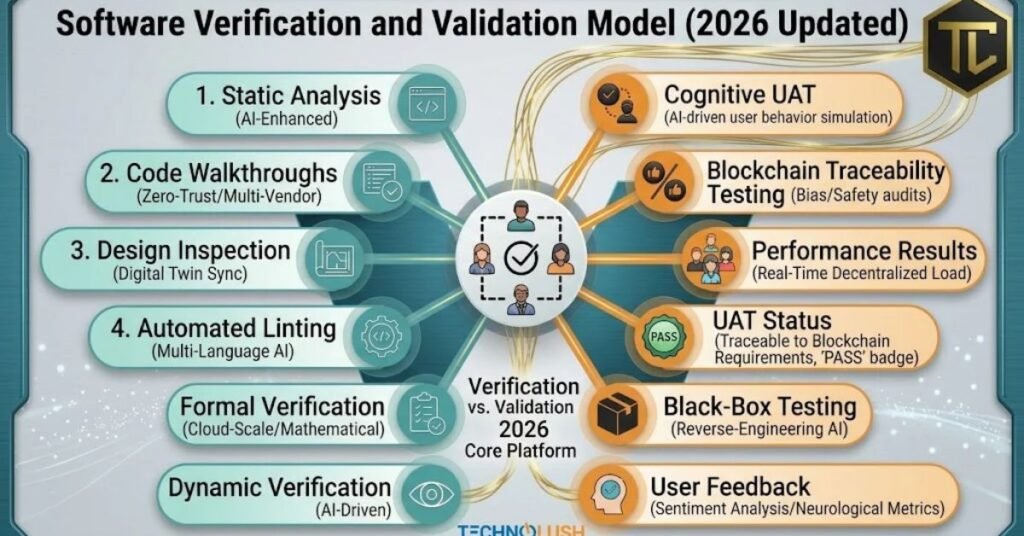
Software engineering practices continue to evolve as teams adopt AI-assisted development, cloud services, automated delivery pipelines, and increasingly complex applications. These changes create new opportunities for V&V, but they also introduce new risks.
AI-assisted software testing
AI-powered tools can help teams generate test cases, summarize defects, identify unusual behavior, and suggest areas that need more coverage. Developers can use these tools to accelerate routine tasks while retaining responsibility for reviewing their output.
AI-generated tests still require human judgment. A test may look convincing but fail to check the intended requirement. Teams should review test logic, verify expected results, and protect sensitive code and data when using AI services.
Continuous verification in CI/CD
Continuous integration and continuous delivery pipelines allow teams to run automated checks whenever developers change code. These checks can include unit tests, static analysis, dependency scanning, and regression testing.
Continuous verification helps teams discover defects closer to the time they introduce them. However, teams still need broader validation before releasing changes that affect important user workflows.
Security-focused verification
Modern applications depend on external libraries, APIs, cloud infrastructure, and third-party services. Security checks therefore need to cover more than application code.
Teams increasingly combine code analysis, dependency checks, threat modeling, access-control tests, and security-focused system testing. They should also validate how applications respond to unauthorized access, unexpected inputs, and service failures.
Cloud and distributed-system validation
Cloud applications often rely on multiple services that communicate over networks. A component may work correctly by itself but fail when another service responds slowly or becomes unavailable.
Teams can test realistic workloads, network interruptions, retry behavior, recovery procedures, and data consistency. These scenarios help establish whether the system remains useful and dependable under expected operating conditions.
Future direction
V&V will likely become more integrated with everyday development workflows. AI assistance, automated evidence collection, risk-based testing, and continuous monitoring can help teams identify problems earlier.
Still, no tool can guarantee defect-free software. Teams must define clear requirements, choose suitable test methods, evaluate evidence, and involve users when their needs determine product success.
Key Takeaways
- Software verification checks whether software conforms to specified requirements.
- Software validation checks whether software meets its intended purpose and user needs.
- Verification often uses reviews, inspections, static analysis, and unit testing.
- Validation often uses system testing, usability testing, and user acceptance testing.
- Both activities should begin early and continue throughout the software life cycle.
- Automation and AI can support V&V, but teams must review results and test real-world scenarios.
- Clear requirements, traceability, risk-based testing, and defined release criteria improve the process.
Conclusion
Software verification and validation help development teams build reliable products that meet technical requirements and solve real problems. Although these practices work toward the same goal, they answer different questions.
Verification checks whether the team built the software correctly. Validation checks whether the team built the right software for its users.
A strong quality process combines both activities throughout requirements gathering, design, development, integration, release, and maintenance. Teams should use code reviews and automated checks to identify implementation defects while using realistic scenarios and user feedback to assess whether the product meets its intended purpose.
In 2026, AI tools and continuous testing can make these activities faster and more consistent. However, sound requirements, careful evaluation, and human judgment remain essential.
By treating verification and validation as complementary practices, software teams can reduce avoidable errors, manage risks, improve user confidence, and make better release decisions.
Frequently Asked Questions
1. What is software verification and validation?
Software verification checks whether software meets its specifications. Software validation checks whether it meets its intended purpose and user needs.
2. What is the main difference between verification and validation?
Verification asks, “Are we building the product right?” Validation asks, “Are we building the right product?”
3. Is software testing part of verification or validation?
Testing can support both. Verification testing checks conformance to specifications, while validation testing evaluates intended use and user needs.
4. When should software verification begin?
Verification should begin during requirements gathering and continue through design, coding, integration, testing, and maintenance.
5. When does software validation take place?
Validation can occur throughout development. Teams can review user needs early and evaluate complete workflows as the software becomes available.
6. Who performs verification and validation?
Developers, QA engineers, software architects, independent reviewers, business stakeholders, and representative users may participate, depending on the project.
7. Can automation replace manual verification and validation?
No. Automation improves repeatability and speed, but human reviews, usability assessments, and stakeholder feedback remain important.
8. Why are verification and validation important?
They help teams detect defects, assess product suitability, manage risks, and gather evidence before making release decisions.
9. What is independent verification and validation (IV&V)?
IV&V involves evaluating software processes and products with an appropriate level of independence from the development team. It can provide additional confidence for high-risk projects.
10. What is the difference between QA and verification and validation?
Quality assurance (QA) focuses on the processes used to achieve quality. Verification and validation are activities that evaluate development outputs and the software’s suitability for use.