




Quick Answer:
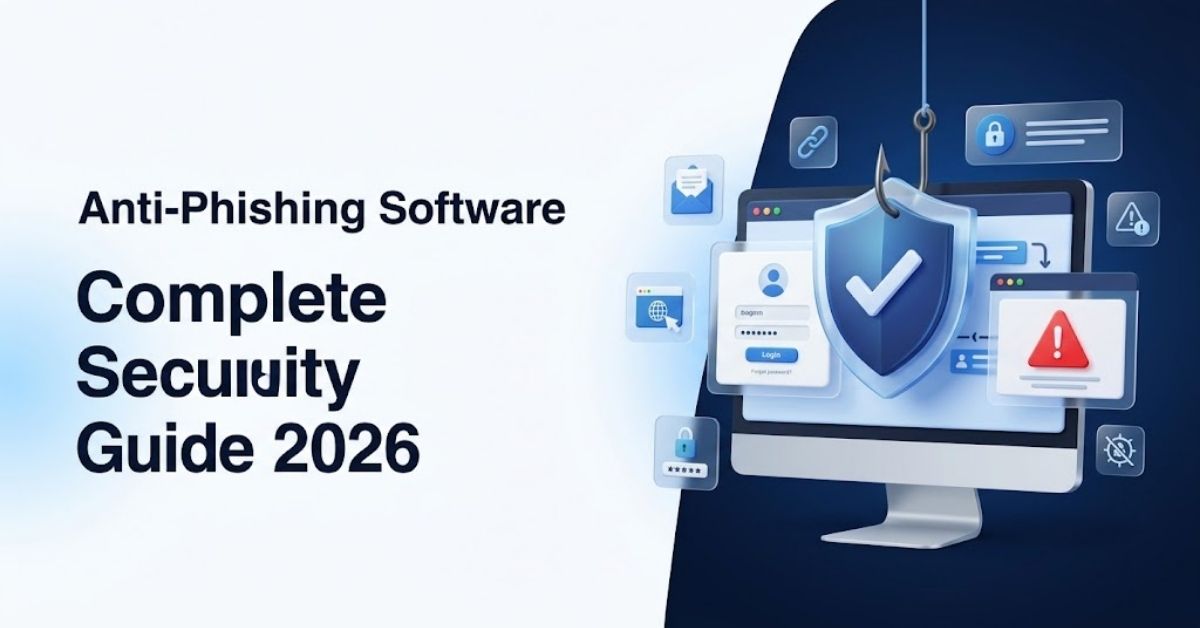
Anti-phishing software detects and blocks fake websites, malicious links, scam emails, and deceptive messages before they can steal sensitive information.
It can use URL reputation checks, browser warnings, email filtering, machine learning, and real-time threat intelligence.
The best protection combines anti-phishing software with strong passwords, multi-factor authentication, software updates, and careful user behavior.
Author Information
Author: Gulnaz Malik
Role: Founder, Publisher & Technology Content Specialist
Experience: 5+ Years in Technology, AI, Software & Digital Innovation
Content Review: All content follows Google’s latest EEAT guidelines and includes fact-checked information from official documentation, trusted technology sources, industry reports, and practical research to ensure accuracy, reliability, and up-to-date insights.
Introduction
Phishing remains one of the most common ways criminals try to steal passwords, financial information, personal details, and business data.
A phishing attack often looks simple. You receive an email, text, or social media message. It may appear to come from a bank, online store, employer, delivery company, or familiar service.
The message then asks you to click a link, open an attachment, confirm an account, or make a payment.The trick works because the message looks legitimate.
Anti-phishing software adds another layer of protection. It checks suspicious links, websites, emails, attachments, and online behavior.
When the software detects a potential threat, it can block the page or warn you before you continue.
The Federal Trade Commission explains that phishing messages often impersonate trusted organizations and attempt to obtain sensitive information. (Federal Trade Commission)
This guide explains how anti-phishing software works, what features matter, where it helps most, its limitations, common problems, and how to choose the right solution.
Table of Contents
- What Is Anti-Phishing Software?
- How Anti-Phishing Software Works
- Key Features of Anti-Phishing Software
- Types of Phishing Attacks
- Anti-Phishing Software vs Antivirus Software
- How Anti-Phishing Software Protects Different Users
- How to Choose Anti-Phishing Software
- How to Set Up Anti-Phishing Software
- Common Anti-Phishing Software Problems
- Best Practices for Phishing Protection
- Latest Anti-Phishing Trends in 2026
- Future of Anti-Phishing Software
- Key Takeaways
- Conclusion
- FAQs
What Is Anti-Phishing Software?

Anti-phishing software is a security tool that helps users identify and block deceptive websites, emails, messages, and links designed to steal information.
Phishing attacks usually depend on deception rather than technical complexity. A criminal may create a fake login page that looks almost identical to a legitimate website. The attacker then sends the victim a link to that page.
If the victim enters a username and password, the attacker can capture the information.Anti-phishing software attempts to stop this process.
The software can inspect a website address, compare it with known threat databases, analyze suspicious page behavior, examine email content, and use reputation systems to determine whether a destination looks dangerous.
For example, imagine that you receive an email claiming that your online banking account needs verification.
You click the link.
Before the fake page loads, your browser security tool checks the destination. If the system identifies the website as suspicious, it displays a warning or blocks access.
This approach can prevent an attack before you submit your information.
Anti-phishing protection can appear inside:
- Web browsers
- Antivirus suites
- Email security platforms
- Endpoint security software
- Password managers
- DNS security services
- Business security platforms
- Mobile security applications
The exact features vary by product.
Understanding the difference between software categories also helps when selecting security tools. TechCrebia’s guide to the difference between software and hardware explains the basic relationship between software and the devices that run it. (techcrebia.com)
How Anti-Phishing Software Works
Anti-phishing software uses several detection techniques. No single technique can identify every phishing campaign, so modern solutions combine multiple signals.
URL and Website Reputation
The software checks website addresses against reputation databases.
If security researchers have already identified a domain as malicious, the software can block it immediately.
For example:
- You click a suspicious link.
- The security tool identifies the destination.
- It checks the URL against threat intelligence.
- It detects a known malicious destination.
- It blocks the page or displays a warning.
This process can happen within seconds.
Real-Time Website Analysis
Some tools analyze websites while you browse.
They may examine:
- Domain information
- Page behavior
- Redirects
- Login forms
- Suspicious scripts
- Known attack patterns
- Security reputation
This approach can help detect newly created phishing websites that have not yet appeared on older blocklists.
Email Filtering
Email security systems can analyze incoming messages before they reach your inbox.
They may inspect:
- Sender information
- Links
- Attachments
- Message content
- Domain reputation
- Spoofing indicators
- Suspicious formatting
A message that looks like a bank notification may trigger a warning if the sender or link does not match the expected organization.
Machine Learning
Modern security systems can also use machine learning to identify unusual patterns.
For example, a system may recognize that a message contains language, links, or sender behavior associated with previous phishing campaigns.
Machine learning does not make phishing detection perfect. Attackers continuously change their techniques.
Browser Warnings
Browser-based protection gives users a warning before they visit known dangerous websites.
This feature works especially well when users click links from:
- Emails
- Text messages
- Social networks
- Search results
- Online advertisements
- Unknown websites
Key Features of Anti-Phishing Software
The quality of anti-phishing software depends on more than its ability to block one suspicious website.
Look for a solution that provides several layers of protection.
Essential Detection Features
- Real-time URL scanning
- Malicious website blocking
- Email link analysis
- Suspicious attachment detection
- Domain reputation checks
- Browser warnings
- Fraud detection
- Redirect protection
Account Protection Features
- Password security
- Multi-factor authentication support
- Login warnings
- Credential monitoring
- Suspicious sign-in alerts
Advanced Security Features
- AI-assisted threat detection
- Behavioral analysis
- Threat intelligence
- Zero-day protection
- DNS filtering
- Endpoint monitoring
- Centralized security management
A business may need advanced controls that a home user does not need.
For example, a small office may benefit from centralized reporting, employee alerts, and email filtering. A home user may only need browser protection and malicious-link blocking.
Types of Phishing Attacks
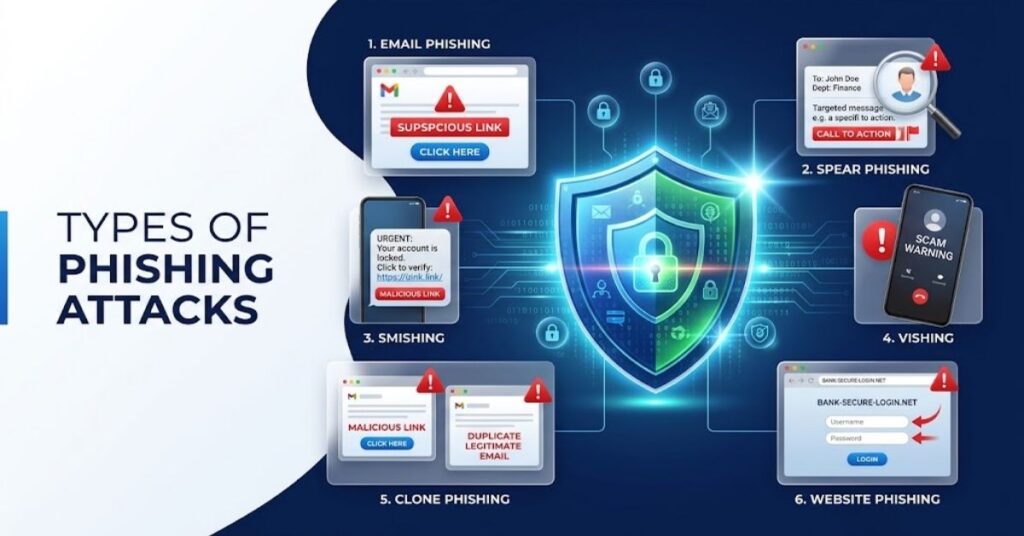
Phishing does not always involve email. Attackers use many communication channels.
Email Phishing
- Fake account warnings
- Fake invoices
- Delivery notifications
- Password reset messages
- Fake subscription alerts
- Banking scams
Spear Phishing
Spear phishing targets a specific person or organization.
The attacker may research the target before creating the message. This approach can make the scam more convincing.
Smishing
Smishing uses text messages.
A typical example involves a fake delivery message containing a link that supposedly lets you reschedule a package.
Vishing
Vishing uses voice calls.
A criminal may pretend to represent a bank, technology company, government agency, or other trusted organization.
Social Media Phishing
Attackers may create fake profiles or send deceptive direct messages.
They can use stolen branding, fake promotions, and urgent messages to encourage users to click malicious links.
Search Engine Phishing
Attackers sometimes create deceptive pages designed to appear in search results.
A user searching for a software download, support page, or account login may accidentally visit a fake site.
This makes it important to verify the website address before entering sensitive information.
Anti-Phishing Software vs Antivirus Software
Anti-phishing software and antivirus software overlap, but they focus on different threats.
| Feature | Anti-Phishing Software | Antivirus Software |
| Fake websites | Strong focus | Often supported |
| Malicious links | Strong focus | Usually supported |
| Scam emails | Often supported | Sometimes supported |
| Malware files | Limited or varies | Strong focus |
| Viruses | Not the main focus | Core function |
| Browser protection | Common | Common |
| Identity protection | Some products | Some products |
| Real-time scanning | Common | Common |
Many modern security suites combine both functions.
That approach can provide broader protection because phishing can lead to malware infections, credential theft, financial fraud, or account compromise.
You should not assume that installing antivirus software automatically solves every phishing risk. User awareness remains important.
How Anti-Phishing Software Protects Different Users
Different users face different phishing risks.
Home Users
Home users often encounter phishing through email, text messages, social media, shopping websites, and fake technical support pages.
A good security setup should include:
- Browser protection
- Email filtering
- Multi-factor authentication
- Password management
- Automatic updates
Students
Students may encounter fake scholarship offers, job advertisements, university login pages, and free software downloads.
They should also avoid downloading software from unknown websites.
Remote Workers
Remote workers face additional risks because they regularly access business systems from outside the office.
Attackers may impersonate:
- Managers
- IT departments
- HR teams
- Cloud services
- Payment departments
A strong anti-phishing system can reduce these risks through email scanning, endpoint protection, and suspicious-link warnings.
Businesses
Businesses face potentially larger consequences because one compromised account can expose internal systems or customer information.
Companies should combine anti-phishing software with:
- Employee security training
- Multi-factor authentication
- Email authentication
- Endpoint security
- Access controls
- Regular backups
- Incident response procedures
How to Choose Anti-Phishing Software
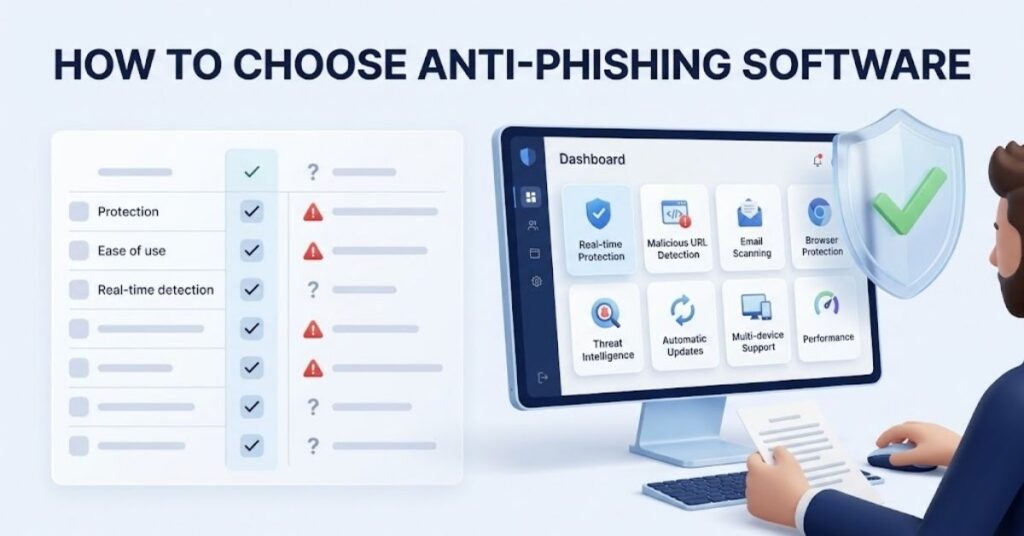
Choosing the right security tool requires more than looking at a product’s feature list.
First, identify your main risk.
If you mainly worry about suspicious websites, prioritize browser and URL protection.
If your biggest concern involves business email, choose a platform with strong email filtering and sender analysis.
Consider these factors:
| Factor | Why It Matters |
| Real-time protection | Detects threats while you browse |
| URL scanning | Helps block dangerous websites |
| Email protection | Filters suspicious messages |
| Browser support | Protects everyday web activity |
| Threat intelligence | Improves detection of known threats |
| Updates | Keeps detection data current |
| Performance | Reduces unnecessary system slowdown |
| Ease of use | Helps users maintain protection |
| Reporting | Helps businesses investigate threats |
| Multi-device support | Protects computers and phones |
Do not choose software only because it has a long feature list.
A simple security product that you keep enabled can provide more practical value than a complicated product that you regularly disable.
How to Set Up Anti-Phishing Software
Start with the official installation package.
Avoid downloading security software from random file-sharing websites. Security tools require significant system access, so you should verify the source carefully.
After installation, follow these steps:
- Enable real-time protection.
- Turn on browser protection.
- Enable malicious-link scanning.
- Activate automatic security updates.
- Configure email protection when available.
- Enable notifications for blocked threats.
- Turn on multi-factor authentication for important accounts.
- Run an initial security scan.
- Review the software’s blocked-threat history.
- Keep the application updated.
You should also configure your browser’s built-in security features.
The Federal Trade Commission recommends avoiding unexpected links and attachments and using multi-factor authentication to make account compromise harder. (Consumer Advice)
Do not disable phishing warnings simply because a blocked page looks familiar.
If you believe the warning represents a mistake, verify the website independently.
Open a new browser tab and manually enter the organization’s known website address rather than following the suspicious link.
Common Anti-Phishing Software Problems
Even good security software can create questions for users.
False Positives
A security tool may occasionally block a legitimate website.
This can happen when a website has poor reputation signals, unusual behavior, or a compromised page.
Do not immediately disable protection.
Instead, verify the website independently and check whether the security provider offers a safe reporting process.
Too Many Warnings
Frequent warnings can annoy users.
However, disabling all alerts creates a bigger security problem.
Review notification settings and keep important threat warnings enabled.
Software Conflicts
Running several security applications with overlapping real-time protection can create conflicts.
You may experience:
- Slow browsing
- Duplicate warnings
- High CPU usage
- Browser problems
- Conflicting network filters
Use one primary real-time security solution unless you understand how the products interact.
TechCrebia also covers software maintenance topics such as the McAfee Software Removal Tool, which can help when users need to remove security software cleanly.
Outdated Protection
Threat intelligence changes constantly.
If the software cannot update its databases or components, its effectiveness can decline.
Enable automatic updates whenever possible.
Phishing That Bypasses Detection
No anti-phishing system catches every attack.
A brand-new phishing domain may not have enough reputation data. A carefully crafted targeted message may also avoid automated detection.
That explains why human judgment still matters.
Best Practices for Phishing Protection
Anti-phishing software works best when users follow basic security habits.
The FTC advises users not to click unexpected links or download unexpected attachments. It also recommends contacting an organization through a website or phone number that you already know instead of using contact details from a suspicious message. (Consumer Advice)
Follow these practices:
- Check the sender carefully.
- Inspect suspicious URLs before clicking.
- Avoid urgent payment requests.
- Never share passwords through email.
- Use multi-factor authentication.
- Keep browsers updated.
- Update operating systems.
- Use unique passwords.
- Keep security software enabled.
- Verify unexpected requests through another channel.
- Report phishing messages when appropriate.
One of the biggest mistakes involves reacting too quickly.
Attackers often create urgency.
A message may say:
Your account will close today.
Or:
Your payment failed. Click now.
Or:
Your package requires immediate confirmation.
Take a moment before acting.
Scammers want emotional reactions because fear and urgency reduce careful decision-making. The FTC also identifies pressure to act immediately as a common scam tactic. (oig.ftc.gov)
Latest Anti-Phishing Trends in 2026
Phishing continues to evolve as attackers gain access to better automation and artificial intelligence.
One important trend involves highly personalized messages.
Attackers can use publicly available information to create messages that appear more relevant to specific people.
Another trend involves fake login pages that closely reproduce legitimate services.
Mobile phishing also deserves attention. People increasingly interact with messages through smartphones, where small screens can make URLs harder to inspect.
QR-code phishing represents another challenge. A QR code can hide the destination address until the user scans it.
AI-generated content also makes scam messages more convincing. Attackers can create polished language, realistic branding, and personalized messages at scale.
Security systems are responding with more advanced behavioral analysis and threat intelligence.
Another important development involves stronger identity protection.
Multi-factor authentication, passkeys, device verification, and risk-based access controls can reduce the damage caused by stolen passwords.
Anti-phishing technology therefore increasingly works as part of a broader identity and endpoint security system.
Future of Anti-Phishing Software
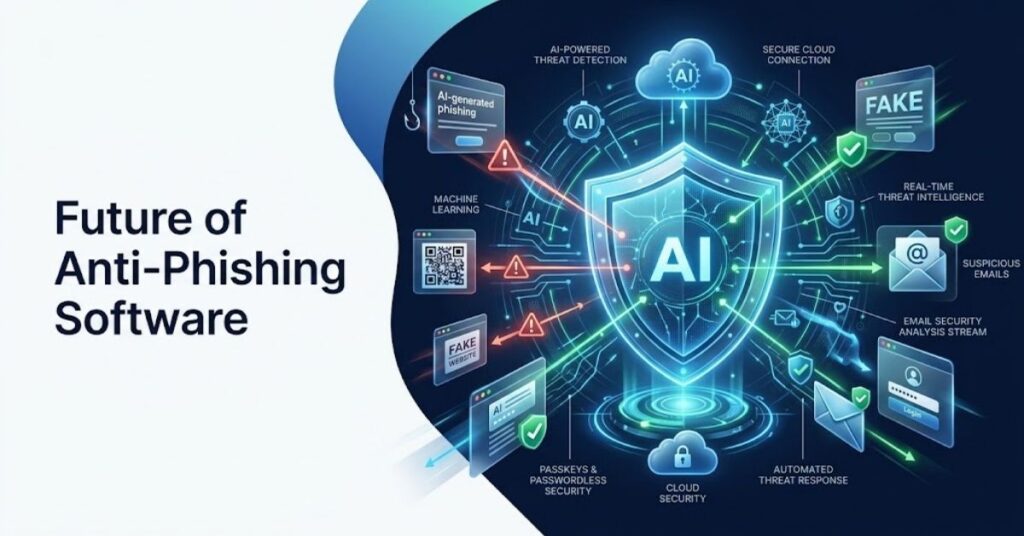
Future anti-phishing software will likely focus on earlier detection and stronger identity protection.
AI-assisted detection will continue to analyze more signals at the same time. Instead of checking only a URL, security systems can evaluate the sender, message context, destination, device, login behavior, and account activity.
Security tools may also become more integrated with operating systems and browsers.
Users may receive security decisions without needing to understand technical details.
Businesses will likely use more automated response systems. A suspicious message could trigger automatic quarantine, account verification, session termination, or administrator alerts.
Passkeys may also reduce the value of stolen passwords because authentication no longer depends entirely on reusable credentials.
However, attackers will continue adapting.
The most effective future strategy will combine technology with user education.
TechCrebia’s productivity software guide also highlights the growing importance of automation and security features across modern software platforms. (techcrebia.com)
Key Takeaways
- Anti-phishing software helps block fake websites, malicious links, and deceptive messages.
- It can use URL reputation, threat intelligence, behavioral analysis, and machine learning.
- Phishing can arrive through email, text messages, social media, calls, and search results.
- Anti-phishing protection does not replace antivirus or account security.
- Multi-factor authentication provides an important additional layer.
- Always verify unexpected requests independently.
- Keep security software, browsers, and operating systems updated.
- Avoid running several overlapping real-time security tools without a clear reason.
- AI is making both phishing attacks and phishing detection more sophisticated.
- No security tool catches every attack, so user awareness remains essential.
Conclusion
Anti-phishing software provides an important defense against modern online scams. It can identify dangerous websites, suspicious links, deceptive messages, and other warning signs before they cause serious damage.
The best protection does not depend on one application.
Use reputable security software. Keep your browser and operating system updated. Enable multi-factor authentication. Use unique passwords. Most importantly, slow down when a message creates urgency or asks for sensitive information.
Phishing attacks will continue to evolve. AI and automation may make scams more convincing, but security tools will also become smarter.
A layered security strategy gives users the best chance of stopping phishing before it becomes an account, identity, or financial problem.
FAQs
What is anti-phishing software?
Anti-phishing software detects and blocks fake websites, malicious links, scam emails, and other deceptive content designed to steal information.
Does anti-phishing software remove malware?
Not always. Anti-phishing tools focus mainly on phishing threats, while antivirus software focuses more heavily on malware detection and removal.
Can anti-phishing software block fake websites?
Yes. Many solutions compare URLs with threat databases and analyze website behavior before allowing access.
Is anti-phishing software necessary?
It provides useful protection, especially when combined with browser security, strong passwords, and multi-factor authentication.
Can phishing bypass security software?
Yes. New or highly targeted phishing attacks may bypass automated detection, so users still need to verify suspicious messages.
Does anti-phishing software protect email?
Many security products scan email links, attachments, sender information, and other indicators of suspicious activity.
Can anti-phishing software protect smartphones?
Yes. Some security applications provide mobile browser, link, website, and message protection.
What should I do if I click a phishing link?
Close the page, avoid entering information, change affected passwords if necessary, enable MFA, and report the phishing attempt.
Can AI detect phishing?
Yes. Some security systems use machine learning and behavioral analysis to identify suspicious messages, links, and websites.
What is the best defense against phishing?
Use layered protection: anti-phishing software, MFA, unique passwords, updated software, and careful verification of unexpected messages.
SEO Tags
- anti-phishing software
- phishing protection software
- anti-phishing tools
- phishing detection software
- email phishing protection
- phishing website blocker
- online security software
- phishing prevention
- cybersecurity software
- phishing protection 2026
Internal Linking Suggestions with Anchor Text
- Difference Between Software and Hardware — use when explaining how security software operates on a computer. (techcrebia.com)
- McAfee Software Removal Tool — use in articles discussing antivirus installation and removal.
- Productivity Software Guide — use when discussing software security and modern workplace applications. (techcrebia.com)
- Fan Controller RGB Software — use in broader software-management content. (techcrebia.com)
- PhysX System Software — use when discussing different categories of system and utility software.
Authoritative External References
- Federal Trade Commission — Protect Yourself From Phishing Scams
- Federal Trade Commission — Phishing Scams and How to Spot Them
Social Media Title
Anti-Phishing Software: Complete 2026 Guide