




Software Defect Life Cycle: Complete Guide for Beginners

September 23, 2026
AUTHOR: GULNAZ MALIK

Tech Specialist & Publisher at Techcrebia. Passionate about artificial intelligence, modern software, and tech insights.

Software Defect Life Cycle: Complete Guide for Beginners

Software Defect Life Cycle: Complete Guide for Beginners Quick Answer The Software Defect Life Cycle (SDLC) is the process a software defect follows from discovery to closure. It helps QA testers and developers identify, report, assign, fix, retest, and verify software defects. Common stages include New, Assigned, Open, Fixed, Retest, Verified, and Closed. A structured defect life cycle helps teams track bugs, improve software quality, reduce risks, and deliver reliable applications. Author Information Author: Gulnaz Malik Role: Founder, Publisher & Technology Content Specialist Experience: 5+ Years in Technology, AI, Software & Digital Innovation Content Review: All content follows Google's EEAT principles and aims to provide accurate, practical information using trusted technology sources, official documentation, and software testing knowledge. Introduction Software applications rarely work perfectly on the first attempt. Even experienced developers can introduce errors while writing code, integrating features, or updating existing systems. A small defect can create a major problem for users. For example, a payment application might calculate the wrong total, or a login page might reject valid passwords. These problems can affect customer trust, business operations, and software security. This is where the Software Defect Life Cycle becomes important. It gives QA testers, developers, and project managers a structured way to manage defects from discovery to resolution. Instead of fixing bugs randomly, teams follow a clear process. They record each defect, assign responsibility, track progress, test the correction, and confirm the final result. This guide explains the software defect life cycle in simple English. You will learn its stages, status flow, real-world examples, severity levels, best practices, common mistakes, and the role of modern testing tools. Whether you are a beginner in software testing or an experienced QA professional, understanding this process can help you manage defects more effectively. Table of Contents What Is the Software Defect Life Cycle? Why Is the Software Defect Life Cycle Important? Stages of the Software Defect Life Cycle Software Defect Life Cycle Workflow Real-World Software Defect Life Cycle Example Defect Life Cycle vs. Bug Life Cycle Defect Severity vs. Priority Common Defect Statuses in Testing Popular Defect Tracking Tools Best Practices for Defect Management Common Mistakes in the Defect Life Cycle Latest Trends in Software Defect Management Key Takeaways Conclusion FAQs What Is the Software Defect Life Cycle? The Software Defect Life Cycle is a structured process that describes how a software defect moves through different stages during testing and development. A defect occurs when an application does not behave according to its requirements, specifications, or expected results. For example, imagine an online shopping website that charges a customer twice for one order. A tester identifies the problem and reports it to the development team. The team investigates the issue, identifies the cause, fixes the code, and sends the application back for testing. The QA tester then checks whether the correction works. If the issue no longer occurs, the team can close the defect. This entire journey represents the software defect life cycle. The process may vary between organizations. Some teams use simple workflows, while others include additional statuses for review, rejection, or deferred fixes. The main goal remains the same: Track every defect until the team reaches a documented decision about its resolution. It is also important to understand that a defect does not always mean a coding mistake. A problem can originate from unclear requirements, incorrect configurations, integration failures, or design issues. For a broader understanding of how software interacts with computer systems, explore TechCrebia's difference between software and hardware guide. Why Is the Software Defect Life Cycle Important? A structured defect life cycle helps software teams maintain control over testing problems. Without a clear process, testers might report the same issue multiple times. Developers might overlook important defects, and managers might struggle to understand the application's actual quality. A well-managed workflow reduces these problems. Here are the main benefits: Better defect tracking: Teams can identify the current status of every reported issue. Clear ownership: Each defect has an assigned person or team responsible for the next action. Faster resolution: Developers receive useful information that helps them investigate problems. Improved communication: Testers, developers, and project managers share a common understanding of defect progress. Higher software quality: Retesting helps teams confirm whether a fix solves the reported problem. Reduced business risk: Teams can identify serious defects before releasing software. Useful reporting: Defect data helps managers understand recurring problems and testing progress. Consider a banking application with 50 reported defects. Without a tracking process, the team may struggle to identify which problems affect payments or account access. A structured defect life cycle helps the team identify critical issues, assign owners, and track each correction. It also supports better decision-making during release planning. A team can review unresolved defects, evaluate their impact, and decide whether the application meets its release requirements. Stages of the Software Defect Life Cycle The software defect life cycle usually includes several stages. Each stage represents a specific action or decision during defect management. Different testing teams may use different names for these stages. However, most workflows follow a similar path from defect discovery to final closure. 1. New The New stage begins when a tester discovers a defect and creates a defect report. The tester records the issue in a defect tracking tool, such as Jira or Azure DevOps. A useful defect report includes: A clear defect title. Steps to reproduce the issue. Expected results. Actual results. Environment and software version. Screenshots, logs, or other supporting evidence. Initial severity and priority. For example, a tester discovers that a shopping cart removes products after the user refreshes the page. The tester creates a defect report and sets its initial status to New. At this point, the team has recorded the problem, but no one has confirmed its cause. 2. Assigned During the Assigned stage, the QA lead or project manager assigns the defect to a developer or responsible team. The assignment depends on the affected feature, technical expertise, and project structure. For example, a payment calculation defect might go to the payment development team. The assigned developer reviews the report and decides whether they need more information. Clear ownership prevents defects from remaining unnoticed in a shared queue. 3. Open The Open stage means the responsible developer has accepted the defect for investigation. The developer reviews the reproduction steps, examines the code, and attempts to identify the root cause. Some teams combine Assigned and Open into one status. Others track them separately to show when a developer begins active investigation. During this stage, the developer may: Reproduce the issue. Review application logs. Inspect relevant code. Check recent changes. Identify the root cause. Decide how to correct the problem. If the developer cannot reproduce the defect, they may request more information from the tester. 4. Fixed The Fixed stage begins when the developer implements a correction and submits it for testing. The developer may update the code, change a configuration, or correct a faulty condition. For example, a developer fixes a shopping cart issue by correcting the code that stores cart information. However, a Fixed status does not mean the defect has been fully resolved from the QA perspective. The tester must still verify the correction. A code change can introduce another problem or fail to address the original issue. Therefore, teams should avoid closing defects immediately after development finishes. 5. Retest During Retest, the QA tester checks the application again to determine whether the developer's correction works. The tester follows the original reproduction steps and compares the actual result with the expected result. If the application now behaves correctly, the tester can move the defect toward verification or closure. If the problem still exists, the tester can reopen the defect and return it to the development team. For example, the tester refreshes the shopping cart several times and confirms that all selected products remain available. Retesting verifies the specific correction. It does not automatically prove that the fix does not affect other application features. 6. Verified The Verified stage indicates that the QA tester has confirmed the reported defect no longer occurs under the tested conditions. The tester records the test results and any relevant evidence. Depending on the team's workflow, the tester may also perform regression testing on related features. For example, after fixing a payment defect, the tester might verify the corrected payment flow and check whether refunds or order totals still work correctly. Verification gives the team evidence that the correction meets the expected behavior. 7. Closed The Closed stage marks the end of the defect's current life cycle. The QA tester or authorized team member closes the defect after confirming that the correction meets the acceptance criteria. The defect record remains available for future reference, reporting, and audits. A closed defect should contain enough information for another team member to understand what happened and how the team resolved it. Some teams close defects directly after successful retesting. Others require a separate Verified status before closure. 8. Reopened Reopened is an important status that can occur when a previously fixed or closed defect appears again. A tester may reopen a defect if the original issue still exists, the correction works only under certain conditions, or a later code change reintroduces the problem. For example, a developer fixes a login defect, but the tester discovers that users can still encounter the same issue on mobile devices. The tester reopens the defect and provides the additional evidence. The developer then investigates the problem again. Reopened defects usually return to an active development status, such as Open or Assigned. Software Defect Life Cycle Workflow The software defect life cycle follows a sequence of status changes. However, the workflow is not always a straight line. A defect can return to development if retesting fails. A team can also reject a report or defer a correction until a future release. The following workflow shows a common approach: New → Assigned → Open → Fixed → Retest → Verified → Closed If the correction fails, the workflow may follow this path: Retest → Reopened → Assigned/Open → Fixed → Retest The team repeats the necessary steps until it verifies the correction or reaches another documented decision. Common Defect Workflow Decisions Defect rejected: The team determines that the report does not represent a valid defect, perhaps because the application behaves according to its requirements. Duplicate: The team identifies an existing report for the same underlying issue and links the new report to it. Deferred: The team postpones the correction to a future release because of scheduling, risk, or business priorities. Cannot reproduce: The team cannot reproduce the reported behavior with the available information. Not a bug: The team confirms that the observed behavior matches the approved requirements. These decisions help prevent teams from treating every report as a confirmed coding defect. A good defect workflow also defines who can change each status. This keeps the process consistent and reduces confusion between QA and development teams. Real-World Software Defect Life Cycle Example Consider a food delivery application that allows customers to place orders online. A customer selects two meals, completes payment, and receives an order confirmation. However, the application records only one meal in the restaurant's order system. This issue can affect customer satisfaction, restaurant operations, and revenue. The QA team can manage the defect through the following process. Stage Action New Tester reports the missing meal issue. Assigned QA lead assigns the defect to the order management developer. Open Developer investigates the order processing logic. Fixed Developer corrects the code responsible for storing order items. Retest Tester places another order with multiple meals. Verified Tester confirms that the application records all selected meals. Closed Tester closes the defect after successful verification. Now imagine the tester still sees the same problem during retesting. The tester reopens the defect and provides updated evidence. The developer investigates the issue again and submits another correction. This example demonstrates why the software defect life cycle needs clear status changes and reliable communication. It also shows why teams should not close defects simply because a developer reports that the code fix is complete. Defect Life Cycle vs. Bug Life Cycle People often use the terms defect life cycle and bug life cycle interchangeably. Both terms generally describe how teams identify, track, investigate, and resolve problems in software. The exact terminology depends on the organization and its testing practices. Aspect Defect Life Cycle Bug Life Cycle Meaning Process for managing reported software defects Process for tracking software bugs Main purpose Control defect reporting, assignment, resolution, and verification Track bug discovery, correction, and closure Typical users QA teams, developers, project managers Testers, developers, support teams Workflow New, Assigned, Open, Fixed, Retest, Closed Often follows similar statuses Practical difference Often used in formal QA processes Often used in general software discussions In most software testing environments, the two terms describe substantially the same workflow. A team should focus more on its actual status definitions than on the label it uses. For more foundational software concepts, TechCrebia's productivity software guide provides additional context about the applications people use to organize and manage their work. Defect Severity vs. Priority Severity and priority help QA teams decide how to handle reported defects. Although these terms often appear together, they measure different things. Severity measures how seriously a defect affects the software. Priority indicates how urgently the team should address it. A defect can have high severity but lower priority in a particular release. A minor visual issue can also receive high priority if it affects an important business deadline. Level Severity Example Priority Example Critical Application exposes sensitive customer data Fix immediately High Payment processing fails for many users Fix before release Medium A major feature works inconsistently Fix in a planned sprint Low Minor visual alignment issue Fix when resources allow These examples illustrate common practices, not universal rules. Each organization should define its own severity and priority criteria. How QA Teams Use Severity and Priority Critical severity: A defect creates a major security, data integrity, or system availability risk. High severity: A key application feature fails, but some users may still have a workaround. Medium severity: A feature has a noticeable problem that does not stop the entire application. Low severity: A defect creates limited inconvenience, such as a small layout issue. Priority depends on business needs, release schedules, affected users, and available workarounds. For example, a spelling mistake on a payment confirmation page might have low technical severity but high business priority before a major product launch. The QA lead and relevant stakeholders should agree on these values rather than relying on assumptions. Common Defect Statuses in Testing A defect tracking tool may include additional statuses beyond the main life cycle stages. These statuses help teams describe unusual situations and manage work more accurately. Status Meaning New A tester has reported the defect. Assigned The team has assigned the defect to an owner. Open The team has accepted the defect for investigation. Fixed The developer has submitted a correction. Retest QA is checking the correction. Verified QA has confirmed the expected result. Closed The team has completed the defect workflow. Reopened The issue requires further investigation. Rejected The team has determined that the report is invalid. Duplicate Another report already covers the same issue. Deferred The team has postponed the correction. Cannot Reproduce The team cannot reproduce the reported behavior. Not every organization uses all these statuses. A small development team may need only five or six statuses. A large enterprise may use a more detailed workflow with additional approval and review steps. The important thing is to define each status clearly and ensure that team members understand when to use it. Popular Defect Tracking Tools Defect tracking tools help teams record issues, assign owners, monitor progress, and maintain a history of testing activity. Many tools also connect defect management with project planning, source control, automated testing, and release management. Here are some widely used options. Tool Common Use Jira Defect tracking, issue management, and Agile workflows Azure DevOps Work item tracking, development planning, and testing Bugzilla Open-source bug tracking GitHub Issues Tracking bugs and tasks alongside code repositories YouTrack Issue tracking and project management TestRail Test case management and integration with defect tracking tools The right tool depends on the team's size, budget, workflow, and technical environment. For example, a small development team may use GitHub Issues, while a larger organization may use Jira or Azure DevOps to manage complex workflows. A good defect tracking tool should make it easy to: Create detailed defect reports. Assign defects to the correct team. Track status changes. Attach screenshots and logs. Set severity and priority. Search historical defects. Generate useful reports. Teams should choose tools that support their actual workflow instead of adding unnecessary complexity. Best Practices for Defect Management A consistent defect management process helps QA teams reduce confusion and improve software quality. The following practices can make the software defect life cycle more effective. Write Clear and Reproducible Defect Reports A developer should understand the reported problem without repeatedly asking the tester for basic information. Include exact reproduction steps, expected behavior, actual behavior, and supporting evidence. Avoid vague titles such as "Application not working." Instead, write a specific title such as "Checkout page displays an incorrect total after applying a discount." Specific reports save time and help developers investigate the correct issue. Prioritize Defects Based on Risk Not every defect needs immediate attention. A payment failure, security issue, or data loss problem may require urgent action. A minor visual issue may fit into a later sprint. QA leads should consider business impact, affected users, available workarounds, and release requirements when setting priority. Retest Every Relevant Fix A developer's confirmation does not replace QA verification. Testers should repeat the original steps and confirm that the reported behavior no longer occurs. They should also consider regression testing when the correction could affect related features. Maintain Accurate Defect Records Keep defect reports updated as they move through the workflow. Record important decisions, status changes, test results, and reasons for rejection or deferral. Accurate records help teams avoid duplicate work and understand recurring problems. Use Official Documentation and Testing Standards QA professionals should understand the terminology and testing principles behind defect management. The ISTQB Glossary provides recognized software testing terminology that helps teams use consistent language when discussing defects, testing, and quality assurance. Teams should also document their own workflow rules so that new testers and developers can follow the same process. Track Defect Trends Defect data can reveal weaknesses in requirements, coding practices, testing coverage, or release planning. For example, repeated defects in the same application module may indicate that the team needs stronger code reviews or more focused regression testing. Reviewing these patterns helps teams prevent future defects rather than simply fixing individual problems. For practical examples of software maintenance, TechCrebia's Windows Driver Update guide explains how software updates and troubleshooting can help address device-related issues. Common Mistakes in the Software Defect Life Cycle Even experienced QA teams can make mistakes that slow defect resolution. Recognizing these problems helps teams maintain a reliable workflow. 1. Reporting incomplete defects Missing reproduction steps or unclear expected results can delay investigation. Always provide enough information for another person to reproduce the issue. 2. Assigning incorrect severity A team may overlook a serious defect if it assigns severity based only on how easy the issue is to reproduce. Evaluate the actual impact on users and system behavior. 3. Closing defects without retesting A code change does not prove that the defect has disappeared. Verify the correction before closing the report. 4. Creating duplicate defect reports Before creating a new report, search the tracking tool for similar issues. Link duplicate reports to the original defect when appropriate. 5. Ignoring reopened defects A reopened defect needs further investigation. Teams should not treat it as resolved simply because a previous fix passed one test. 6. Leaving defects without clear ownership Unassigned defects can remain in the backlog for long periods. Every active defect should have a clear owner or responsible team. 7. Tracking activity instead of quality A high number of closed defects does not automatically mean that the application has improved. Teams should also examine defect severity, recurrence, escaped defects, and customer impact. Latest Trends in Software Defect Management Software testing continues to evolve as development teams adopt automation, cloud platforms, and AI-assisted tools. These changes affect how teams identify, prioritize, investigate, and resolve defects. AI-Assisted Defect Detection AI-powered testing tools can analyze test results, logs, and application behavior to help identify suspicious patterns. Some tools can suggest likely causes, group similar defects, or help testers draft defect reports. However, AI-generated findings still require human review. A tool may misinterpret expected behavior or report an issue that does not represent a real defect. Automated Testing and Continuous Integration Modern development teams often run automated tests whenever developers submit code changes. These tests can detect regressions earlier and provide evidence that helps developers investigate failures. When teams connect automated testing with defect tracking tools, they can create or update defect records more efficiently. Automation does not eliminate the need for manual testing. Exploratory testing, usability checks, and complex user scenarios still benefit from human judgment. Shift-Left Testing Shift-left testing means introducing testing activities earlier in the software development process. Teams review requirements, inspect designs, and run tests before defects reach later development stages. This approach can help teams identify misunderstandings early, when corrections may require less effort. Risk-Based Testing Risk-based testing focuses testing effort on areas with the greatest potential impact. For example, a financial application may require more extensive testing of payment processing, authentication, and transaction records than of minor visual details. Risk-based testing helps QA teams use limited time and resources more effectively. Better Integration Across Development Tools Modern testing environments increasingly connect defect tracking with source control, automated builds, test management, and deployment systems. These integrations help teams trace a defect from its original report to the code change and final verification. As these tools evolve, teams will continue to focus on faster feedback, better traceability, and more reliable defect decisions. AI and automation can support this process, but clear reporting, sound testing practices, and human verification remain essential. Key Takeaways The Software Defect Life Cycle tracks defects from discovery to resolution. Common stages include New, Assigned, Open, Fixed, Retest, Verified, and Closed. A defect may return to development when retesting fails. Severity measures impact, while priority indicates urgency. Clear defect reports help developers investigate issues faster. QA teams should verify corrections before closing defects. Defect tracking tools improve communication, ownership, and reporting. AI and automation can support defect detection, but human review remains important. Accurate defect records help teams improve software quality over time. Conclusion The Software Defect Life Cycle plays an important role in software testing and quality assurance. It gives teams a clear process for identifying, reporting, assigning, fixing, retesting, and closing defects. A well-managed defect life cycle improves communication between testers and developers. It also helps teams prioritize important issues, reduce repeated mistakes, and make informed release decisions. For beginners, understanding each defect status provides a strong foundation in software testing. For experienced QA professionals, improving defect reports, tracking workflows, and analyzing defect trends can make the entire development process more efficient. The goal is not simply to close more defects. The goal is to resolve the right problems, verify the corrections, and deliver software that users can trust. (FAQs) 1. What is the Software Defect Life Cycle? The Software Defect Life Cycle is a structured process for tracking a software defect from discovery and reporting to resolution and closure. 2. What are the main stages of the defect life cycle? Common stages include New, Assigned, Open, Fixed, Retest, Verified, and Closed. Some workflows also include Reopened, Rejected, and Deferred. 3. What is the difference between a defect and a failure? A defect is a flaw in software, while a failure occurs when the software behaves incorrectly during execution. 4. Who is responsible for managing the defect life cycle? QA testers, developers, QA leads, and project managers may all participate, depending on their responsibilities and the team's workflow. 5. When should a tester reopen a defect? A tester should reopen a defect when the original problem still exists or returns after a correction. 6. What is the difference between severity and priority? Severity measures the impact of a defect on the software. Priority indicates how urgently the team should address it. 7. Can a defect be closed without fixing it? Yes. Teams may close a report as rejected, duplicate, or otherwise resolved under their workflow rules, but they should document the reason. 8. Which tools help manage software defects? Jira, Azure DevOps, Bugzilla, GitHub Issues, and YouTrack are examples of tools that support defect or issue tracking. 9. Why is defect retesting important? Retesting confirms whether a correction resolves the reported issue. It helps prevent teams from closing defects that still affect the application. 10. Is the defect life cycle the same as the bug life cycle? In most software testing environments, the terms describe essentially the same process, although individual teams may define their workflows differently. 10 SEO Tags Software Defect Life Cycle Defect Life Cycle in Software Testing Bug Life Cycle Software Testing Defect Management QA Testing Defect Tracking Tools Software Quality Assurance Bug Tracking Process Software Testing Life Cycle 5 Internal Linking Suggestions with Anchor Text These are additional internal linking opportunities for future TechCrebia articles. Use each link only where it naturally supports the content. PhysX System Software: Complete Guide — For software compatibility and troubleshooting topics. Samsung J7 Software Update Guide — For software update errors and testing examples. Samsung Galaxy J7 Update Software — For device software maintenance and update testing. Bluetooth Driver Update: Complete Windows Guide — For driver testing and troubleshooting topics. Fan Controller RGB Software: Complete PC Guide — For hardware-software compatibility and testing examples. 2 Authoritative External References ISTQB Glossary — Software testing terminology and recognized QA definitions. Atlassian Jira Documentation — Official documentation for issue tracking, workflows, and defect management. Social Media Title Software Defect Life Cycle: 7 Key Stages Explained

Quick Answer

The Software Defect Life Cycle (SDLC) is the process a software defect follows from discovery to closure. 

It helps QA testers and developers identify, report, assign, fix, retest, and verify software defects.

 Common stages include New, Assigned, Open, Fixed, Retest, Verified, and Closed. A structured defect life cycle helps teams track bugs, improve software quality, reduce risks, and deliver reliable applications.

Author Information

Author: Gulnaz Malik
Role: Founder, Publisher & Technology Content Specialist
Experience: 5+ Years in Technology, AI, Software & Digital Innovation

Content Review: All content follows Google’s EEAT principles and aims to provide accurate, practical information using trusted technology sources, official documentation, and software testing knowledge.

Introduction

Software applications rarely work perfectly on the first attempt. Even experienced developers can introduce errors while writing code, integrating features, or updating existing systems.

A small defect can create a major problem for users. For example, a payment application might calculate the wrong total, or a login page might reject valid passwords.

These problems can affect customer trust, business operations, and software security.

This is where the Software Defect Life Cycle becomes important. It gives QA testers, developers, and project managers a structured way to manage defects from discovery to resolution.

Instead of fixing bugs randomly, teams follow a clear process. They record each defect, assign responsibility, track progress, test the correction, and confirm the final result.

This guide explains the software defect life cycle in simple English. You will learn its stages, status flow, real-world examples, severity levels, best practices, common mistakes, and the role of modern testing tools.

Whether you are a beginner in software testing or an experienced QA professional, understanding this process can help you manage defects more effectively.

Table of Contents

  • What Is the Software Defect Life Cycle?
  • Why Is the Software Defect Life Cycle Important?
  • Stages of the Software Defect Life Cycle
  • Software Defect Life Cycle Workflow
  • Real-World Software Defect Life Cycle Example
  • Defect Life Cycle vs. Bug Life Cycle
  • Defect Severity vs. Priority
  • Common Defect Statuses in Testing
  • Popular Defect Tracking Tools
  • Best Practices for Defect Management
  • Common Mistakes in the Defect Life Cycle
  • Latest Trends in Software Defect Management
  • Key Takeaways
  • Conclusion
  • FAQs

What Is the Software Defect Life Cycle?

The Software Defect Life Cycle is a structured process that describes how a software defect moves through different stages during testing and development.

A defect occurs when an application does not behave according to its requirements, specifications, or expected results.

For example, imagine an online shopping website that charges a customer twice for one order. A tester identifies the problem and reports it to the development team.

The team investigates the issue, identifies the cause, fixes the code, and sends the application back for testing.

The QA tester then checks whether the correction works. If the issue no longer occurs, the team can close the defect.

This entire journey represents the software defect life cycle.

The process may vary between organizations. Some teams use simple workflows, while others include additional statuses for review, rejection, or deferred fixes.

The main goal remains the same: Track every defect until the team reaches a documented decision about its resolution.

It is also important to understand that a defect does not always mean a coding mistake. A problem can originate from unclear requirements, incorrect configurations, integration failures, or design issues.

For a broader understanding of how software interacts with computer systems, explore TechCrebia’s difference between software and hardware guide.

Why Is the Software Defect Life Cycle Important?

Why Is the Software Defect Life Cycle Important?

A structured defect life cycle helps software teams maintain control over testing problems.

Without a clear process, testers might report the same issue multiple times. Developers might overlook important defects, and managers might struggle to understand the application’s actual quality.

A well-managed workflow reduces these problems.

Here are the main benefits:

  • Better defect tracking: Teams can identify the current status of every reported issue.
  • Clear ownership: Each defect has an assigned person or team responsible for the next action.
  • Faster resolution: Developers receive useful information that helps them investigate problems.
  • Improved communication: Testers, developers, and project managers share a common understanding of defect progress.
  • Higher software quality: Retesting helps teams confirm whether a fix solves the reported problem.
  • Reduced business risk: Teams can identify serious defects before releasing software.
  • Useful reporting: Defect data helps managers understand recurring problems and testing progress.

Consider a banking application with 50 reported defects. Without a tracking process, the team may struggle to identify which problems affect payments or account access.

A structured defect life cycle helps the team identify critical issues, assign owners, and track each correction.

It also supports better decision-making during release planning.

A team can review unresolved defects, evaluate their impact, and decide whether the application meets its release requirements.

Stages of the Software Defect Life Cycle

The software defect life cycle usually includes several stages. Each stage represents a specific action or decision during defect management.

Different testing teams may use different names for these stages. However, most workflows follow a similar path from defect discovery to final closure.

1. New

The New stage begins when a tester discovers a defect and creates a defect report.

The tester records the issue in a defect tracking tool, such as Jira or Azure DevOps.

A useful defect report includes:

  • A clear defect title.
  • Steps to reproduce the issue.
  • Expected results.
  • Actual results.
  • Environment and software version.
  • Screenshots, logs, or other supporting evidence.
  • Initial severity and priority.

For example, a tester discovers that a shopping cart removes products after the user refreshes the page.

The tester creates a defect report and sets its initial status to New.

At this point, the team has recorded the problem, but no one has confirmed its cause.

2. Assigned

During the Assigned stage, the QA lead or project manager assigns the defect to a developer or responsible team.

The assignment depends on the affected feature, technical expertise, and project structure.

For example, a payment calculation defect might go to the payment development team.

The assigned developer reviews the report and decides whether they need more information.

Clear ownership prevents defects from remaining unnoticed in a shared queue.

3. Open

The Open stage means the responsible developer has accepted the defect for investigation.

The developer reviews the reproduction steps, examines the code, and attempts to identify the root cause.

Some teams combine Assigned and Open into one status. Others track them separately to show when a developer begins active investigation.

During this stage, the developer may:

  • Reproduce the issue.
  • Review application logs.
  • Inspect relevant code.
  • Check recent changes.
  • Identify the root cause.
  • Decide how to correct the problem.

If the developer cannot reproduce the defect, they may request more information from the tester.

4. Fixed

The Fixed stage begins when the developer implements a correction and submits it for testing.

The developer may update the code, change a configuration, or correct a faulty condition.

For example, a developer fixes a shopping cart issue by correcting the code that stores cart information.

However, a Fixed status does not mean the defect has been fully resolved from the QA perspective.

The tester must still verify the correction.

A code change can introduce another problem or fail to address the original issue. Therefore, teams should avoid closing defects immediately after development finishes.

5. Retest

During Retest, the QA tester checks the application again to determine whether the developer’s correction works.

The tester follows the original reproduction steps and compares the actual result with the expected result.

If the application now behaves correctly, the tester can move the defect toward verification or closure.

If the problem still exists, the tester can reopen the defect and return it to the development team.

For example, the tester refreshes the shopping cart several times and confirms that all selected products remain available.

Retesting verifies the specific correction. It does not automatically prove that the fix does not affect other application features.

6. Verified

The Verified stage indicates that the QA tester has confirmed the reported defect no longer occurs under the tested conditions.

The tester records the test results and any relevant evidence.

Depending on the team’s workflow, the tester may also perform regression testing on related features.

For example, after fixing a payment defect, the tester might verify the corrected payment flow and check whether refunds or order totals still work correctly.

Verification gives the team evidence that the correction meets the expected behavior.

7. Closed

The Closed stage marks the end of the defect’s current life cycle.

The QA tester or authorized team member closes the defect after confirming that the correction meets the acceptance criteria.

The defect record remains available for future reference, reporting, and audits.

A closed defect should contain enough information for another team member to understand what happened and how the team resolved it.

Some teams close defects directly after successful retesting. Others require a separate Verified status before closure.

8. Reopened

Reopened is an important status that can occur when a previously fixed or closed defect appears again.

A tester may reopen a defect if the original issue still exists, the correction works only under certain conditions, or a later code change reintroduces the problem.

For example, a developer fixes a login defect, but the tester discovers that users can still encounter the same issue on mobile devices.

The tester reopens the defect and provides the additional evidence.

The developer then investigates the problem again.

Reopened defects usually return to an active development status, such as Open or Assigned.

Software Defect Life Cycle Workflow

Software Defect Life Cycle Workflow

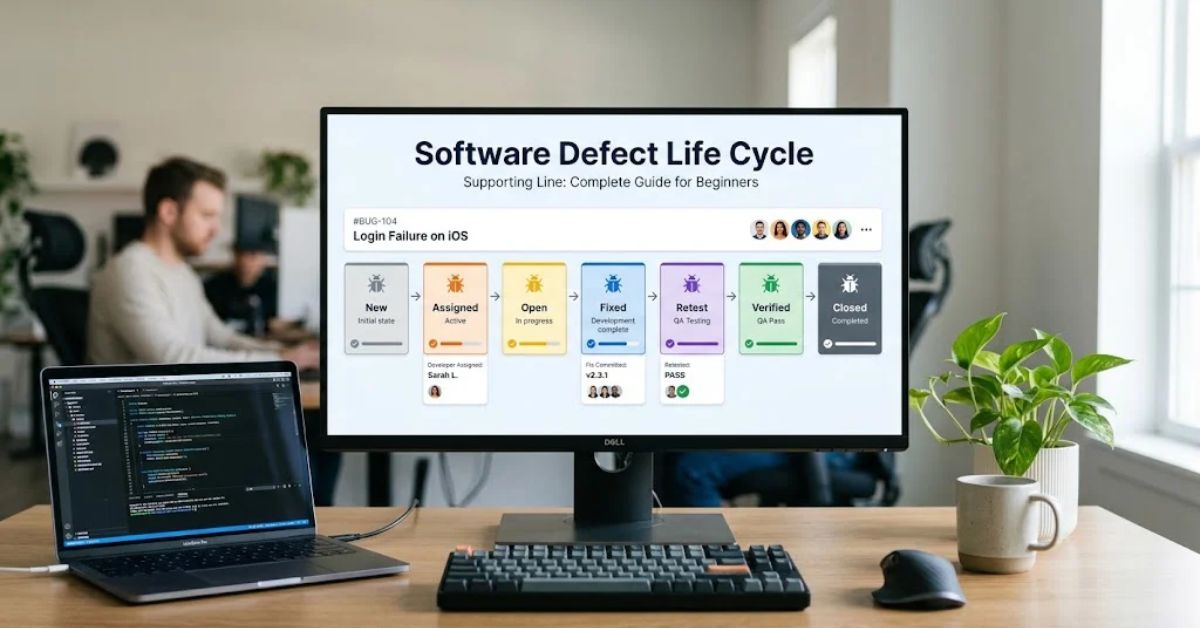
The software defect life cycle follows a sequence of status changes. However, the workflow is not always a straight line.

A defect can return to development if retesting fails. A team can also reject a report or defer a correction until a future release.

The following workflow shows a common approach:

New → Assigned → Open → Fixed → Retest → Verified → Closed

If the correction fails, the workflow may follow this path:

Retest → Reopened → Assigned/Open → Fixed → Retest

The team repeats the necessary steps until it verifies the correction or reaches another documented decision.

Common Defect Workflow Decisions

  • Defect rejected: The team determines that the report does not represent a valid defect, perhaps because the application behaves according to its requirements.
  • Duplicate: The team identifies an existing report for the same underlying issue and links the new report to it.
  • Deferred: The team postpones the correction to a future release because of scheduling, risk, or business priorities.
  • Cannot reproduce: The team cannot reproduce the reported behavior with the available information.
  • Not a bug: The team confirms that the observed behavior matches the approved requirements.

These decisions help prevent teams from treating every report as a confirmed coding defect.

A good defect workflow also defines who can change each status. This keeps the process consistent and reduces confusion between QA and development teams.

Real-World Software Defect Life Cycle Example

Consider a food delivery application that allows customers to place orders online.

A customer selects two meals, completes payment, and receives an order confirmation. However, the application records only one meal in the restaurant’s order system.

This issue can affect customer satisfaction, restaurant operations, and revenue.

The QA team can manage the defect through the following process.

StageAction
NewTester reports the missing meal issue.
AssignedQA lead assigns the defect to the order management developer.
OpenDeveloper investigates the order processing logic.
FixedDeveloper corrects the code responsible for storing order items.
RetestTester places another order with multiple meals.
VerifiedTester confirms that the application records all selected meals.
ClosedTester closes the defect after successful verification.

Now imagine the tester still sees the same problem during retesting.

The tester reopens the defect and provides updated evidence. The developer investigates the issue again and submits another correction.

This example demonstrates why the software defect life cycle needs clear status changes and reliable communication.

It also shows why teams should not close defects simply because a developer reports that the code fix is complete.

Defect Life Cycle vs. Bug Life Cycle

People often use the terms defect life cycle and bug life cycle interchangeably.

Both terms generally describe how teams identify, track, investigate, and resolve problems in software.

The exact terminology depends on the organization and its testing practices.

AspectDefect Life CycleBug Life Cycle
MeaningProcess for managing reported software defectsProcess for tracking software bugs
Main purposeControl defect reporting, assignment, resolution, and verificationTrack bug discovery, correction, and closure
Typical usersQA teams, developers, project managersTesters, developers, support teams
WorkflowNew, Assigned, Open, Fixed, Retest, ClosedOften follows similar statuses
Practical differenceOften used in formal QA processesOften used in general software discussions

In most software testing environments, the two terms describe substantially the same workflow.

A team should focus more on its actual status definitions than on the label it uses.

For more foundational software concepts, TechCrebia’s productivity software guide provides additional context about the applications people use to organize and manage their work.

Defect Severity vs. Priority

Severity and priority help QA teams decide how to handle reported defects.

Although these terms often appear together, they measure different things.

Severity measures how seriously a defect affects the software. Priority indicates how urgently the team should address it.

A defect can have high severity but lower priority in a particular release. A minor visual issue can also receive high priority if it affects an important business deadline.

LevelSeverity ExamplePriority Example
CriticalApplication exposes sensitive customer dataFix immediately
HighPayment processing fails for many usersFix before release
MediumA major feature works inconsistentlyFix in a planned sprint
LowMinor visual alignment issueFix when resources allow

These examples illustrate common practices, not universal rules. Each organization should define its own severity and priority criteria.

How QA Teams Use Severity and Priority

  • Critical severity: A defect creates a major security, data integrity, or system availability risk.
  • High severity: A key application feature fails, but some users may still have a workaround.
  • Medium severity: A feature has a noticeable problem that does not stop the entire application.
  • Low severity: A defect creates limited inconvenience, such as a small layout issue.

Priority depends on business needs, release schedules, affected users, and available workarounds.

For example, a spelling mistake on a payment confirmation page might have low technical severity but high business priority before a major product launch.

The QA lead and relevant stakeholders should agree on these values rather than relying on assumptions.

Common Defect Statuses in Testing

A defect tracking tool may include additional statuses beyond the main life cycle stages.

These statuses help teams describe unusual situations and manage work more accurately.

StatusMeaning
NewA tester has reported the defect.
AssignedThe team has assigned the defect to an owner.
OpenThe team has accepted the defect for investigation.
FixedThe developer has submitted a correction.
RetestQA is checking the correction.
VerifiedQA has confirmed the expected result.
ClosedThe team has completed the defect workflow.
ReopenedThe issue requires further investigation.
RejectedThe team has determined that the report is invalid.
DuplicateAnother report already covers the same issue.
DeferredThe team has postponed the correction.
Cannot ReproduceThe team cannot reproduce the reported behavior.

Not every organization uses all these statuses.

A small development team may need only five or six statuses. A large enterprise may use a more detailed workflow with additional approval and review steps.

The important thing is to define each status clearly and ensure that team members understand when to use it.

Popular Defect Tracking Tools

Defect tracking tools help teams record issues, assign owners, monitor progress, and maintain a history of testing activity.

Many tools also connect defect management with project planning, source control, automated testing, and release management.

Here are some widely used options.

ToolCommon Use
JiraDefect tracking, issue management, and Agile workflows
Azure DevOpsWork item tracking, development planning, and testing
BugzillaOpen-source bug tracking
GitHub IssuesTracking bugs and tasks alongside code repositories
YouTrackIssue tracking and project management
TestRailTest case management and integration with defect tracking tools

The right tool depends on the team’s size, budget, workflow, and technical environment.

For example, a small development team may use GitHub Issues, while a larger organization may use Jira or Azure DevOps to manage complex workflows.

A good defect tracking tool should make it easy to:

  • Create detailed defect reports.
  • Assign defects to the correct team.
  • Track status changes.
  • Attach screenshots and logs.
  • Set severity and priority.
  • Search historical defects.
  • Generate useful reports.

Teams should choose tools that support their actual workflow instead of adding unnecessary complexity.

Best Practices for Defect Management

Best Practices for Defect Management

A consistent defect management process helps QA teams reduce confusion and improve software quality.

The following practices can make the software defect life cycle more effective.

Write Clear and Reproducible Defect Reports

A developer should understand the reported problem without repeatedly asking the tester for basic information.

Include exact reproduction steps, expected behavior, actual behavior, and supporting evidence.

Avoid vague titles such as “Application not working.”

Instead, write a specific title such as “Checkout page displays an incorrect total after applying a discount.”

Specific reports save time and help developers investigate the correct issue.

Prioritize Defects Based on Risk

Not every defect needs immediate attention.

A payment failure, security issue, or data loss problem may require urgent action. A minor visual issue may fit into a later sprint.

QA leads should consider business impact, affected users, available workarounds, and release requirements when setting priority.

Retest Every Relevant Fix

A developer’s confirmation does not replace QA verification.

Testers should repeat the original steps and confirm that the reported behavior no longer occurs.

They should also consider regression testing when the correction could affect related features.

Maintain Accurate Defect Records

Keep defect reports updated as they move through the workflow.

Record important decisions, status changes, test results, and reasons for rejection or deferral.

Accurate records help teams avoid duplicate work and understand recurring problems.

Use Official Documentation and Testing Standards

QA professionals should understand the terminology and testing principles behind defect management.

The ISTQB Glossary provides recognized software testing terminology that helps teams use consistent language when discussing defects, testing, and quality assurance.

Teams should also document their own workflow rules so that new testers and developers can follow the same process.

Track Defect Trends

Defect data can reveal weaknesses in requirements, coding practices, testing coverage, or release planning.

For example, repeated defects in the same application module may indicate that the team needs stronger code reviews or more focused regression testing.

Reviewing these patterns helps teams prevent future defects rather than simply fixing individual problems.

For practical examples of software maintenance, TechCrebia’s Windows Driver Update guide explains how software updates and troubleshooting can help address device-related issues.

Common Mistakes in the Software Defect Life Cycle

Even experienced QA teams can make mistakes that slow defect resolution.

Recognizing these problems helps teams maintain a reliable workflow.

1. Reporting incomplete defects

Missing reproduction steps or unclear expected results can delay investigation. Always provide enough information for another person to reproduce the issue.

2. Assigning incorrect severity

A team may overlook a serious defect if it assigns severity based only on how easy the issue is to reproduce. Evaluate the actual impact on users and system behavior.

3. Closing defects without retesting

A code change does not prove that the defect has disappeared. Verify the correction before closing the report.

4. Creating duplicate defect reports

Before creating a new report, search the tracking tool for similar issues. Link duplicate reports to the original defect when appropriate.

5. Ignoring reopened defects

A reopened defect needs further investigation. Teams should not treat it as resolved simply because a previous fix passed one test.

6. Leaving defects without clear ownership

Unassigned defects can remain in the backlog for long periods. Every active defect should have a clear owner or responsible team.

7. Tracking activity instead of quality

A high number of closed defects does not automatically mean that the application has improved. Teams should also examine defect severity, recurrence, escaped defects, and customer impact.

Latest Trends in Software Defect Management

Latest Trends in Software Defect Management

Software testing continues to evolve as development teams adopt automation, cloud platforms, and AI-assisted tools.

These changes affect how teams identify, prioritize, investigate, and resolve defects.

AI-Assisted Defect Detection

AI-powered testing tools can analyze test results, logs, and application behavior to help identify suspicious patterns.

Some tools can suggest likely causes, group similar defects, or help testers draft defect reports.

However, AI-generated findings still require human review. A tool may misinterpret expected behavior or report an issue that does not represent a real defect.

Automated Testing and Continuous Integration

Modern development teams often run automated tests whenever developers submit code changes.

These tests can detect regressions earlier and provide evidence that helps developers investigate failures.

When teams connect automated testing with defect tracking tools, they can create or update defect records more efficiently.

Automation does not eliminate the need for manual testing. Exploratory testing, usability checks, and complex user scenarios still benefit from human judgment.

Shift-Left Testing

Shift-left testing means introducing testing activities earlier in the software development process.

Teams review requirements, inspect designs, and run tests before defects reach later development stages.

This approach can help teams identify misunderstandings early, when corrections may require less effort.

Risk-Based Testing

Risk-based testing focuses testing effort on areas with the greatest potential impact.

For example, a financial application may require more extensive testing of payment processing, authentication, and transaction records than of minor visual details.

Risk-based testing helps QA teams use limited time and resources more effectively.

Better Integration Across Development Tools

Modern testing environments increasingly connect defect tracking with source control, automated builds, test management, and deployment systems.

These integrations help teams trace a defect from its original report to the code change and final verification.

As these tools evolve, teams will continue to focus on faster feedback, better traceability, and more reliable defect decisions.

AI and automation can support this process, but clear reporting, sound testing practices, and human verification remain essential.

Key Takeaways

  • The Software Defect Life Cycle tracks defects from discovery to resolution.
  • Common stages include New, Assigned, Open, Fixed, Retest, Verified, and Closed.
  • A defect may return to development when retesting fails.
  • Severity measures impact, while priority indicates urgency.
  • Clear defect reports help developers investigate issues faster.
  • QA teams should verify corrections before closing defects.
  • Defect tracking tools improve communication, ownership, and reporting.
  • AI and automation can support defect detection, but human review remains important.
  • Accurate defect records help teams improve software quality over time.

Conclusion

The Software Defect Life Cycle plays an important role in software testing and quality assurance. It gives teams a clear process for identifying, reporting, assigning, fixing, retesting, and closing defects.

A well-managed defect life cycle improves communication between testers and developers. It also helps teams prioritize important issues, reduce repeated mistakes, and make informed release decisions.

For beginners, understanding each defect status provides a strong foundation in software testing. For experienced QA professionals, improving defect reports, tracking workflows, and analyzing defect trends can make the entire development process more efficient.

The goal is not simply to close more defects. The goal is to resolve the right problems, verify the corrections, and deliver software that users can trust.

(FAQs)

1. What is the Software Defect Life Cycle?

The Software Defect Life Cycle is a structured process for tracking a software defect from discovery and reporting to resolution and closure.

2. What are the main stages of the defect life cycle?

Common stages include New, Assigned, Open, Fixed, Retest, Verified, and Closed. Some workflows also include Reopened, Rejected, and Deferred.

3. What is the difference between a defect and a failure?

A defect is a flaw in software, while a failure occurs when the software behaves incorrectly during execution.

4. Who is responsible for managing the defect life cycle?

QA testers, developers, QA leads, and project managers may all participate, depending on their responsibilities and the team’s workflow.

5. When should a tester reopen a defect?

A tester should reopen a defect when the original problem still exists or returns after a correction.

6. What is the difference between severity and priority?

Severity measures the impact of a defect on the software. Priority indicates how urgently the team should address it.

7. Can a defect be closed without fixing it?

Yes. Teams may close a report as rejected, duplicate, or otherwise resolved under their workflow rules, but they should document the reason.

8. Which tools help manage software defects?

Jira, Azure DevOps, Bugzilla, GitHub Issues, and YouTrack are examples of tools that support defect or issue tracking.

9. Why is defect retesting important?

Retesting confirms whether a correction resolves the reported issue. It helps prevent teams from closing defects that still affect the application.

10. Is the defect life cycle the same as the bug life cycle?

In most software testing environments, the terms describe essentially the same process, although individual teams may define their workflows differently.

10 SEO Tags

  1. Software Defect Life Cycle
  2. Defect Life Cycle in Software Testing
  3. Bug Life Cycle
  4. Software Testing
  5. Defect Management
  6. QA Testing
  7. Defect Tracking Tools
  8. Software Quality Assurance
  9. Bug Tracking Process
  10. Software Testing Life Cycle

5 Internal Linking Suggestions with Anchor Text

These are additional internal linking opportunities for future TechCrebia articles. Use each link only where it naturally supports the content.

  1. PhysX System Software: Complete Guide — For software compatibility and troubleshooting topics.
  2. Samsung J7 Software Update Guide — For software update errors and testing examples.
  3. Samsung Galaxy J7 Update Software — For device software maintenance and update testing.
  4. Bluetooth Driver Update: Complete Windows Guide — For driver testing and troubleshooting topics.
  5. Fan Controller RGB Software: Complete PC Guide — For hardware-software compatibility and testing examples.

2 Authoritative External References

  1. ISTQB Glossary — Software testing terminology and recognized QA definitions.
  2. Atlassian Jira Documentation — Official documentation for issue tracking, workflows, and defect management.

Social Media Title

Software Defect Life Cycle: 7 Key Stages Explained

Table of Contents