





Quick Answer:
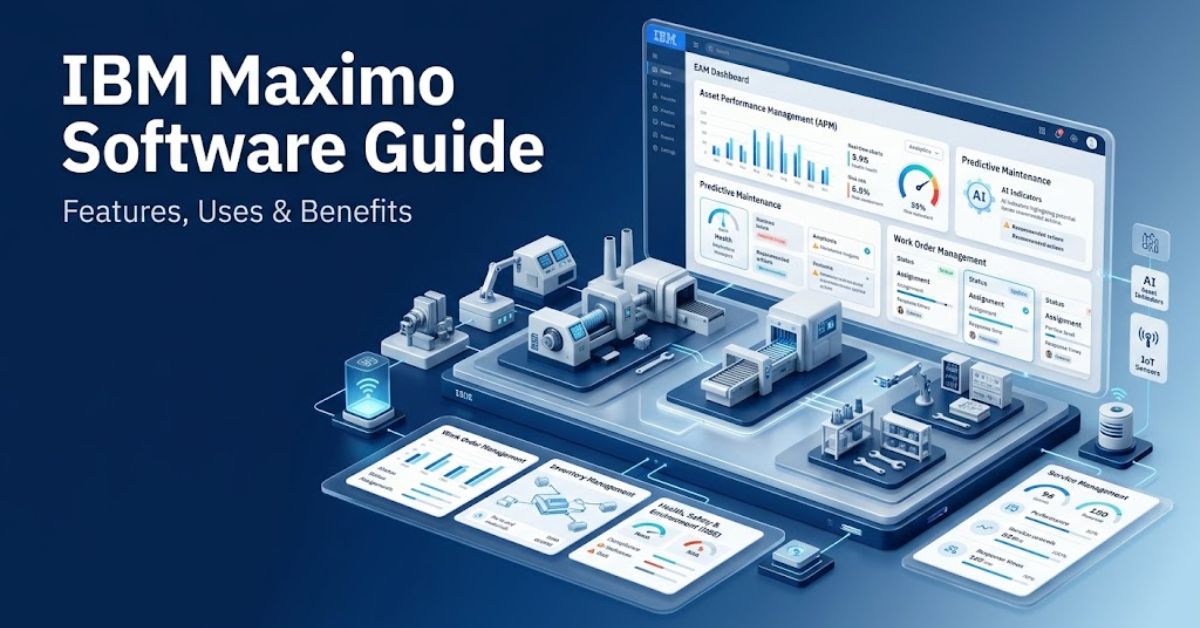
IBM Maximo Software provides enterprise asset management for organizations that manage equipment, facilities, fleets, infrastructure, and maintenance operations.
Maximo Application Suite combines asset management, maintenance, inspections, reliability, analytics, and AI capabilities.
Businesses can use it to track assets, plan work, manage inventory, monitor performance, and improve lifecycle decisions.
Author Information
Author: Gulnaz Malik
Role: Founder, Publisher & Technology Content Specialist
Experience: 5+ Years in Technology, AI, Software & Digital Innovation
Content Review: All content follows Google’s latest EEAT guidelines and includes fact-checked information from official documentation, trusted technology sources, industry reports, and practical research to ensure accuracy, reliability, and up-to-date insights.
Introduction
Modern organizations depend on physical assets to deliver products and services. Factories use machines. Utilities manage power equipment. Airlines maintain aircraft. Hospitals operate complex facilities. Transportation companies manage vehicles and infrastructure.
When teams manage thousands of assets, spreadsheets and disconnected maintenance tools quickly create problems.
Workers may lose maintenance records. Managers may struggle to prioritize repairs. Procurement teams may lack accurate inventory data. Executives may also lack a clear view of asset costs and risks.
IBM Maximo Software addresses these challenges through enterprise asset management, maintenance management, asset performance management, and related capabilities.
IBM currently positions Maximo Application Suite as a unified platform that brings maintenance, inspections, reliability, and asset lifecycle management together.
This guide explains IBM Maximo Software from beginner to advanced level. You will learn what Maximo does, its main features, use cases, benefits, challenges, implementation practices, AI capabilities, and future trends.
If you are new to enterprise technology, you can first review TechCrebia’s guide to the difference between software and hardware to understand the basic software concepts behind enterprise platforms. (techcrebia.com)
Table of Contents
- What Is IBM Maximo Software?
- How IBM Maximo Software Works
- Key Features of IBM Maximo Software
- IBM Maximo Application Suite and Its Main Components
- IBM Maximo Software Use Cases
- Benefits of IBM Maximo Software
- IBM Maximo Software vs Traditional Maintenance Tools
- How to Implement IBM Maximo Software
- Common IBM Maximo Software Challenges
- Troubleshooting and Best Practices
- IBM Maximo Software, AI, IoT, and Analytics
- Latest IBM Maximo Software Trends
- Future of IBM Maximo Software
- Key Takeaways
- Conclusion
- FAQs
- SEO Tags
- Internal Linking Suggestions
- Authoritative External References
- Social Media Title
- Social Media Description
What Is IBM Maximo Software?
IBM Maximo Software is an enterprise asset management platform that helps organizations manage physical assets and the work connected to those assets.
Maximo can support asset records, work orders, maintenance schedules, inventory, purchasing, inspections, safety processes, and asset performance.
IBM now presents these capabilities through Maximo Application Suite, which combines several asset and analytics applications.
Think of Maximo as a central control system for asset-intensive organizations.
For example, imagine a manufacturing company with 500 production machines. Each machine needs inspections, preventive maintenance, spare parts, repair work, and performance tracking.
Maximo can connect these activities.
A technician can receive a work order. The system can show the related asset history. The technician can record the repair. The inventory team can track the parts used. Managers can review maintenance costs and asset performance.
This connected approach gives organizations better operational visibility.
Maximo also goes beyond simple maintenance tracking. IBM supports enterprise asset management, asset performance management, and asset investment planning within the current Maximo Application Suite.
How IBM Maximo Software Works
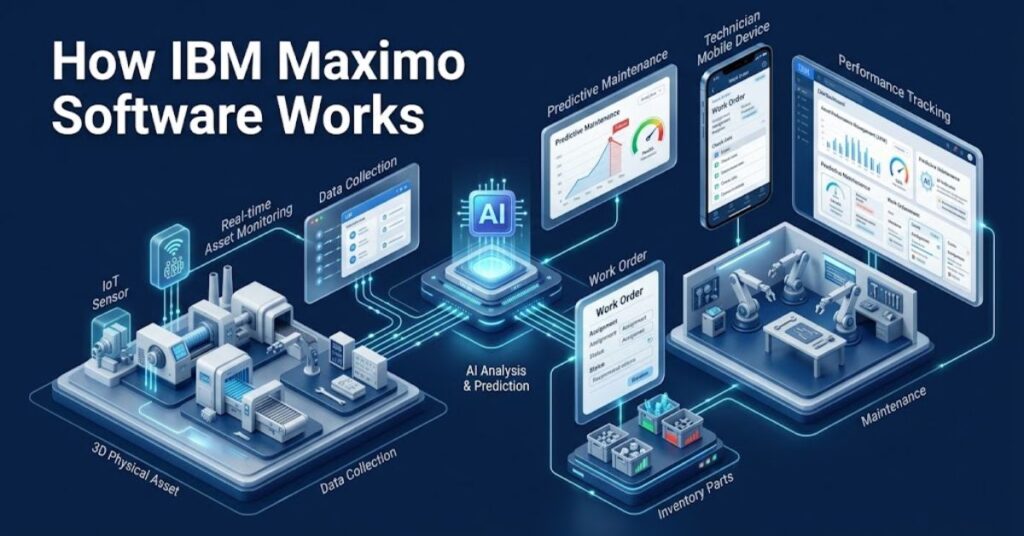
IBM Maximo Software integrates asset information, maintenance activities, people, materials, workflows, and operational data.
The process usually starts with an asset record. An organization creates records for machines, vehicles, buildings, infrastructure, or other important equipment.
Teams then connect maintenance plans and work processes to those assets.
A simple workflow might look like this:
- A company registers an industrial pump in Maximo.
- The maintenance team creates a preventive maintenance schedule.
- Maximo generates a work order when the scheduled service approaches.
- A technician receives the task.
- The technician checks the equipment and records findings.
- The system records labor, parts, costs, and completion details.
- Managers review the asset history and performance.
- The organization uses the information to improve future maintenance decisions.
This workflow creates a continuous record of asset activity.
Maximo can also connect condition data and analytics to maintenance processes. IBM describes Maximo as a platform that uses AI, analytics, and sensor data to support earlier issue detection and condition-based maintenance.
Organizations can deploy Maximo in different ways depending on their environment. IBM documentation describes both IBM-managed and customer-managed Maximo Application Suite deployments.
Key Features of IBM Maximo Software
IBM Maximo Software provides many features for organizations with complex asset operations.
Asset Management
- Create detailed asset records.
- Track asset locations and status.
- Maintain historical asset information.
- Connect assets with maintenance activities.
- Track asset lifecycle information.
Asset management gives teams a central source of information. Instead of searching through separate spreadsheets, employees can work from connected asset records.
Work Management
- Create work orders.
- Assign work to technicians.
- Track work progress.
- Record labor and material usage.
- Monitor completed maintenance.
- Manage planned and unplanned work.
Work management forms the foundation of many Maximo implementations. It helps maintenance teams organize daily work and improve accountability.
Preventive Maintenance
Preventive maintenance helps organizations service assets before failures occur.
Teams can create schedules based on time, meter readings, usage, or operating conditions. For example, a fleet company can schedule vehicle maintenance based on mileage.
This approach can reduce unnecessary emergency work and improve asset reliability.
Inventory Management
Maximo also helps organizations manage maintenance, repair, and operations inventory.
Teams can track spare parts, stock levels, locations, reorder requirements, and material usage. Better inventory visibility can help maintenance teams avoid delays caused by missing parts.
Procurement and Contracts
Organizations can connect maintenance requirements with purchasing and supplier processes.
This helps teams manage purchase requests, vendors, contracts, and related costs from connected workflows.
Reporting and Analytics
Managers need accurate data to make good maintenance decisions.
Maximo can provide operational information about work, assets, costs, inventory, and performance. Organizations can use this information to identify recurring problems and improve maintenance strategies.
Businesses that want to understand software categories can also explore TechCrebia’s productivity software guide for a broader look at how software supports business workflows. (techcrebia.com)
IBM Maximo Application Suite and Its Main Components
IBM Maximo Application Suite represents the current Maximo platform approach. The suite combines multiple applications, industry solutions, add-ons, and tools for enterprise asset management.
It helps organizations connect maintenance, asset performance, reliability, inspections, and other operational processes within one platform.
Maximo Manage
Maximo Manage focuses on enterprise asset management and maintenance operations.
Organizations can use it to manage assets, work, inventory, purchasing, and related business processes.
Maximo Health
Maximo Health focuses on asset health and performance information.
It can help teams understand asset condition and identify assets that need attention.
Maximo Predict
Maximo Predict supports predictive maintenance strategies.
Organizations can use data and analytics to identify potential equipment problems before they become serious failures.
Maximo Monitor
Maximo Monitor helps organizations analyze asset and operational data.
It can connect information from sensors and other sources to help teams understand asset behavior.
Maximo Mobile
Mobile capabilities help technicians access asset and work information while working in the field.
This matters because maintenance workers often need information at the equipment location rather than at a desktop computer.
Other Suite Capabilities
Maximo Application Suite also supports areas such as asset investment planning, reliability, inspection, and industry-specific operations.
IBM highlights use cases across manufacturing, energy, utilities, oil and gas, transportation, government, facilities, renewables, and data centers.
IBM Maximo Software Use Cases
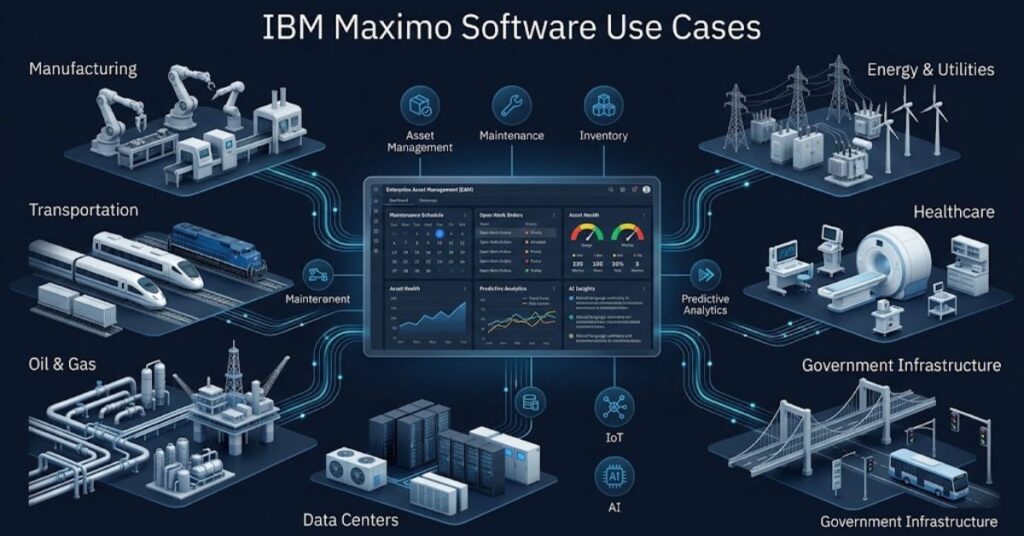
Organizations use IBM Maximo Software in many asset-intensive industries.
Manufacturing: Factories can track production equipment, preventive maintenance, spare parts, and work orders.
Energy and utilities: Utility companies can manage infrastructure, generation equipment, transmission assets, and maintenance activities.
Transportation: Fleet operators can manage vehicles, rail equipment, facilities, and related maintenance.
Oil and gas: Companies can monitor critical equipment, inspections, maintenance, safety, and compliance activities.
Government: Public agencies can manage roads, bridges, tunnels, buildings, and other infrastructure.
Healthcare: Hospitals can manage facilities, equipment, maintenance tasks, and operational services.
Data centers: Operators can monitor critical infrastructure and plan maintenance for equipment that supports continuous operations.
IBM highlights real-world Maximo deployments across industries. For example, IBM reports that Transport for London uses Maximo to support field technicians and maintenance activities across its network.
A practical example makes the concept easier.
Imagine a water utility that operates hundreds of pumps. A pump develops abnormal vibration. Sensor data can help identify the change.
The maintenance team can inspect the asset, create or update a work order, check available parts, assign a technician, and record the repair.
This workflow turns raw asset information into an actionable maintenance process.
Benefits of IBM Maximo Software
IBM Maximo Software can provide several benefits when an organization implements it correctly.
First, Maximo creates centralized asset information. Teams can access asset history, maintenance records, work details, and related information from connected workflows.
Second, Maximo can improve maintenance planning. Preventive and condition-based approaches can help organizations move away from purely reactive repairs.
Third, Maximo can improve inventory visibility. Maintenance teams can identify available parts and reduce unnecessary stock problems.
Fourth, Maximo can support better decision-making. Managers can analyze asset condition, work history, costs, and operational information.
Fifth, Maximo can support mobile work. Technicians can access relevant information while they work on equipment.
Sixth, AI and analytics can help teams identify patterns and prioritize actions. IBM describes embedded AI across maintenance, field execution, reliability, and planning.
For organizations that want a wider understanding of modern software categories, TechCrebia’s software and hardware comparison provides useful background on how software interacts with physical technology. (techcrebia.com)
IBM Maximo Software vs Traditional Maintenance Tools
Traditional maintenance teams often depend on spreadsheets, paper forms, email, and disconnected applications.
Maximo takes a more integrated approach.
| Area | Traditional Tools | IBM Maximo Software |
| Asset records | Separate files | Centralized asset data |
| Work orders | Manual tracking | Structured workflows |
| Maintenance | Often reactive | Preventive and condition-based options |
| Inventory | Spreadsheet-based | Integrated inventory management |
| Reporting | Manual reports | Connected operational data |
| Mobile work | Limited | Mobile capabilities |
| Analytics | Basic | Advanced analytics and AI options |
| Asset lifecycle | Fragmented | Connected lifecycle approach |
However, Maximo also brings greater complexity than a simple spreadsheet or small CMMS.
A business should not choose Maximo simply because it has many features. The organization should choose it when its asset-management requirements justify the platform.
How to Implement IBM Maximo Software
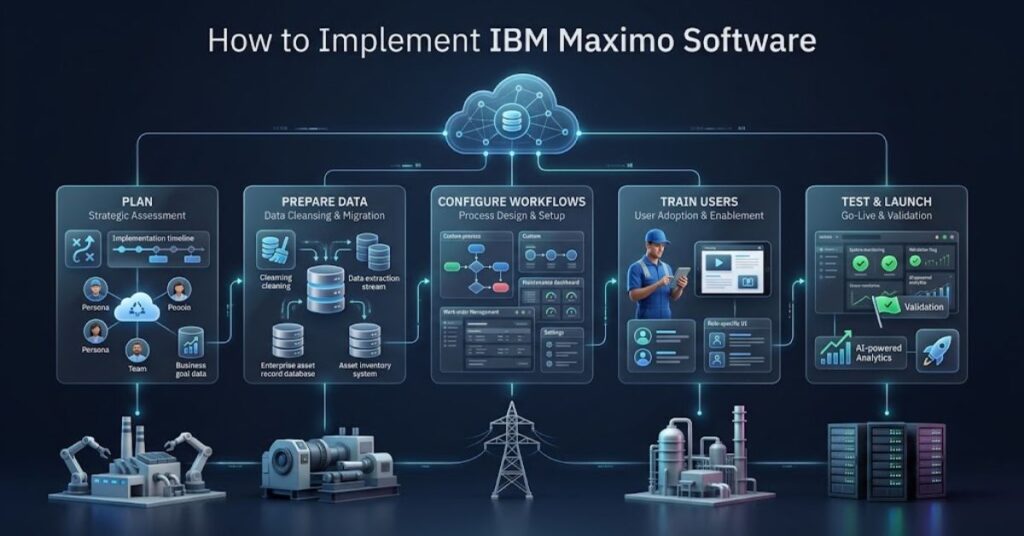
A successful Maximo implementation starts with business requirements rather than technical configuration.
Plan the Project
- Define the business problems first.
- Identify critical assets.
- Document current maintenance workflows.
- Set measurable goals.
- Identify project stakeholders.
Avoid trying to configure every feature immediately.
Prepare Asset Data
- Clean duplicate asset records.
- Standardize naming.
- Define asset hierarchies.
- Review location structures.
- Validate inventory records.
- Remove outdated information.
Poor data can damage an otherwise strong Maximo implementation.
Configure Workflows
- Map approval processes.
- Define work-order statuses.
- Create maintenance responsibilities.
- Configure notifications.
- Establish security roles.
Keep workflows simple whenever possible.
Train Users
- Train technicians on daily tasks.
- Train planners on work management.
- Train inventory teams on stock processes.
- Train administrators on configuration.
- Provide practical exercises.
Training should match each employee’s role.
Test Before Launch
Run realistic scenarios before production deployment.
For example, test a complete maintenance process from asset selection through work-order creation, technician assignment, inventory usage, completion, and reporting.
Do not test only individual screens. Test complete business workflows.
Common IBM Maximo Software Challenges
Maximo can provide significant value, but organizations can also face challenges.
One common challenge involves implementation complexity. Large organizations often have complicated processes, multiple sites, legacy systems, and inconsistent data.
Another challenge involves user adoption. Technicians may resist a system if it adds unnecessary steps to their daily work.
Data quality creates another risk. Incorrect asset names, locations, classifications, or inventory information can reduce reporting accuracy.
Integration can also create technical challenges. Large organizations may need to connect Maximo with ERP, finance, HR, IoT, GIS, procurement, or other systems.
Licensing and infrastructure also require careful planning. IBM currently offers client-managed and SaaS approaches, and Maximo Application Suite uses an AppPoint-based licensing model.
The best approach focuses on business value rather than maximum customization.
Troubleshooting and Best Practices
When users experience Maximo problems, they should start with the simplest possible checks.
Work order problems: Check status, permissions, workflow rules, required fields, and assignment details.
Inventory problems: Check item numbers, storerooms, balances, reservations, and reorder settings.
Slow performance: Review system resources, database performance, integrations, queries, and configuration.
Integration errors: Check authentication, endpoint settings, payload data, logs, and integration configuration.
User access problems: Review security groups, application permissions, site access, and user records.
Follow these best practices:
- Keep configurations documented.
- Limit unnecessary customization.
- Clean master data regularly.
- Test changes before production.
- Train users continuously.
- Monitor integration failures.
- Review workflows regularly.
- Back up critical data according to your deployment strategy.
- Use official IBM documentation when troubleshooting product-specific behavior.
TechCrebia also covers software maintenance topics such as PhysX System Software, which shows why software versions, installation, compatibility, and troubleshooting matter across technology environments. (techcrebia.com)
IBM Maximo Software, AI, IoT, and Analytics
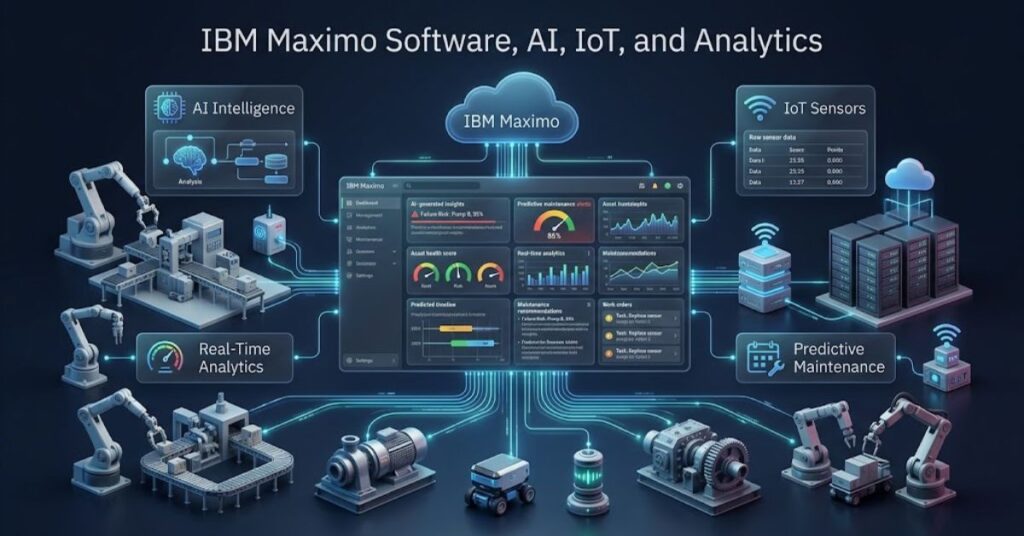
AI represents one of the most important developments in modern Maximo deployments.
Traditional maintenance often relies on fixed schedules. A team may service equipment every 30 days because the maintenance plan requires it.
Condition-based and predictive approaches use asset information to support more targeted decisions.
For example, sensors may provide temperature, vibration, pressure, or other operating data. Analytics can identify unusual patterns. AI can then help maintenance teams prioritize assets that need attention.
This approach can support a shift from reactive maintenance toward proactive maintenance.
IBM describes Maximo as using AI, analytics, and sensor data to help detect issues early and support condition-based maintenance.
IoT also plays an important role. Connected equipment can produce large amounts of operational data. Maximo can help connect this information with asset and maintenance processes.
AI does not eliminate the need for technicians. Human expertise remains important. AI can help teams identify patterns, while experienced workers validate findings and perform physical inspections and repairs.
For more context on current AI developments, TechCrebia’s AI Latest News 2026 guide covers broader AI trends across technology and business. (techcrebia.com)
Latest IBM Maximo Software Trends
Several trends continue to shape enterprise asset management.
AI-assisted maintenance: Organizations increasingly want AI to help prioritize work and identify potential failures.
Predictive maintenance: Businesses continue moving from fixed maintenance schedules toward condition-based strategies.
Mobile-first field work: Technicians need asset information directly at the work location.
Cloud deployment: Cloud services can simplify infrastructure management and support scalable operations.
Connected assets: IoT sensors can provide continuous equipment data.
Asset lifecycle planning: Organizations increasingly evaluate repair, refurbishment, replacement, risk, and financial impact together.
IBM’s current Maximo offering reflects these trends by combining EAM, APM, asset investment planning, AI, analytics, and specialized industry capabilities.
Future of IBM Maximo Software

The future of IBM Maximo Software will likely focus on deeper automation, stronger AI assistance, connected assets, and better lifecycle decisions.
Organizations will want maintenance systems that do more than record work. They will expect systems to recommend priorities, identify risks, explain asset behavior, and support investment decisions.
AI agents may also become more useful in maintenance workflows. Instead of simply displaying information, intelligent systems can help users summarize asset history, identify unusual conditions, prepare work information, and suggest next steps.
Digital twins may also become more valuable for complex infrastructure. Organizations can combine asset models, sensor data, maintenance records, and operational information to create richer views of physical systems.
IBM already positions Maximo around asset lifecycle management, reliability, AI, and connected operational data.
The long-term goal remains practical: help organizations keep critical assets available, safe, efficient, and financially useful for as long as possible.
Key Takeaways
- IBM Maximo Software provides enterprise asset management capabilities.
- Maximo Application Suite combines multiple asset and analytics applications.
- Maximo helps manage assets, work orders, maintenance, inventory, and related processes.
- Organizations use Maximo across manufacturing, utilities, transportation, government, healthcare, and other industries.
- AI, IoT, analytics, and predictive maintenance play increasingly important roles.
- Successful implementations depend heavily on clean data, clear workflows, training, and user adoption.
- Businesses should match Maximo capabilities with real operational requirements.
- Future Maximo development will likely focus on AI, automation, connected assets, and lifecycle optimization.
Conclusion
IBM Maximo Software gives asset-intensive organizations a structured way to manage equipment, maintenance, inventory, work, performance, and lifecycle decisions.
Its biggest strength comes from connecting these areas instead of treating each process separately. A maintenance task can connect to an asset. The asset can connect to historical data. Parts can connect to the work order. Analytics can help teams understand performance.
Maximo Application Suite also brings AI, IoT, analytics, reliability, and asset investment capabilities into a broader platform.
However, Maximo does not automatically solve every maintenance problem. Organizations need clean data, practical workflows, trained users, strong governance, and clear implementation goals.
For large and complex asset environments, Maximo can provide a powerful foundation for modern enterprise asset management.
FAQ
What is IBM Maximo Software?
IBM Maximo Software is an enterprise asset management platform that helps organizations manage assets, maintenance, work, inventory, reliability, and lifecycle activities.
Is IBM Maximo an ERP?
Maximo focuses mainly on asset and maintenance management rather than serving as a complete ERP system.
What does IBM Maximo Manage do?
Maximo Manage supports core enterprise asset management processes such as assets, work management, inventory, purchasing, and maintenance.
Does IBM Maximo use AI?
Yes. IBM integrates AI capabilities into Maximo to support maintenance, reliability, field execution, and asset lifecycle decisions.
Who uses IBM Maximo?
Manufacturers, utilities, transportation companies, governments, healthcare organizations, energy companies, and other asset-intensive businesses use Maximo.
Can Maximo support predictive maintenance?
Yes. Maximo Application Suite includes capabilities that use analytics, asset data, and sensor information to support predictive and condition-based maintenance.
Is IBM Maximo cloud-based?
IBM offers Maximo Application Suite through SaaS as well as client-managed deployment options. (IBM)
What is AppPoints in Maximo?
AppPoints provide the usage and access licensing model that IBM uses for Maximo Application Suite applications, solutions, add-ons, and tools.
Is Maximo good for small businesses?
Maximo can work for smaller organizations, but businesses should evaluate its features, implementation needs, and cost against their actual asset-management requirements.
What should companies do before implementing Maximo?
Companies should define requirements, clean asset data, map workflows, plan integrations, establish governance, and train users before deployment.
SEO Tags
- IBM Maximo Software
- IBM Maximo Guide
- Maximo Application Suite
- IBM Maximo Asset Management
- Enterprise Asset Management
- Maximo Maintenance Software
- Maximo Manage
- Predictive Maintenance Software
- Asset Performance Management
- IBM Enterprise Software
Internal Linking Suggestions with Anchor Text
- Difference Between Software and Hardware → https://techcrebia.com/difference-between-software-and-hardware/
- Productivity Software Guide → https://techcrebia.com/productivity-software/
- PhysX System Software → https://techcrebia.com/physx-system-software/
- Samsung Galaxy J7 Update Software → https://techcrebia.com/samsung-galaxy-j7-update-software/
- AI Latest News 2026 → https://techcrebia.com/ai-latest-news-2026/
Authoritative External References
- IBM Maximo Application Suite Official Product Page
- IBM Maximo Application Suite Official Documentation
Social Media Title
IBM Maximo Software Guide: Features, Uses & Benefits
Social Media Description
Discover how IBM Maximo manages enterprise assets, maintenance, work orders, inventory, AI, IoT, predictive maintenance, and asset lifecycle decisions.