





Quick Answer
A software stack is a group of technologies that work together to build and run an application.
A typical web stack includes a frontend, backend, database, runtime, APIs, and deployment tools.
Developers choose a stack based on performance, scalability, security, development speed, team skills, and project requirements.
Author Information
Author: Gulnaz Malik
Role: Founder, Publisher & Technology Content Specialist
Experience: 5+ Years in Technology, AI, Software & Digital Innovation
Content Review: All content follows Google’s latest EEAT guidelines and includes fact-checked information from official documentation, trusted technology sources, industry reports, and practical research to ensure accuracy, reliability, and up-to-date insights.
Introduction
Every modern application depends on multiple technologies working together. A website may use HTML, CSS, JavaScript, a frontend framework, a backend language, a database, an API, cloud services, and deployment tools.
Developers call this combination a software stack.
The term sounds technical, but the basic idea remains simple. A software stack describes the collection of technologies that a team uses to build, operate, and maintain an application.
For example, a web application might use React for the frontend, Node.js for the backend, PostgreSQL for data storage, and Docker for deployment. Together, these technologies form part of the application’s stack.
This guide explains the software stack from beginner to advanced level. You will learn its layers, common examples, popular combinations, benefits, challenges, selection process, and future trends.
Table of Contents
- What Is a Software Stack?
- How a Software Stack Works
- Main Layers of a Software Stack
- Popular Software Stack Examples
- Software Stack vs Technology Stack
- How to Choose a Software Stack
- Benefits of Using the Right Stack
- Common Software Stack Mistakes
- Software Stack Security Best Practices
- Software Stack Troubleshooting
- Modern Trends in Software Stacks
- Software Stack for Different Projects
- Key Takeaways
- Conclusion
- FAQs
What Is a Software Stack?
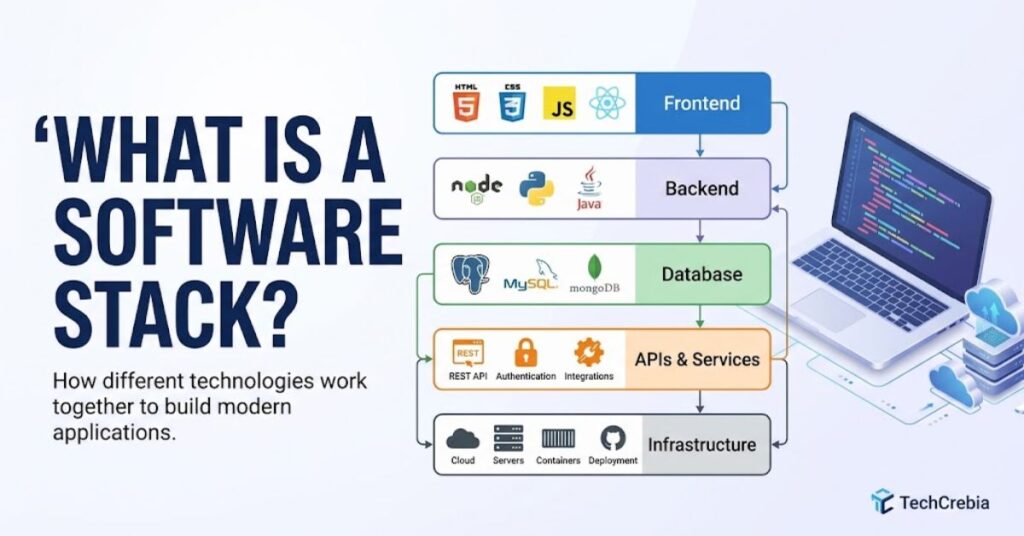
A software stack is a collection of programming languages, frameworks, libraries, databases, operating systems, development tools, and infrastructure technologies that work together to create an application.
Think about an online shopping website.
The customer sees product pages and buttons through the frontend. The backend processes orders and payments.
The database stores customer and product information. APIs connect different services. Cloud infrastructure keeps everything available online.
Each part performs a different job.
A software stack brings these parts together into one working environment.
A stack can remain small or become highly complex. A personal project might use three or four major technologies. A large enterprise platform can use dozens of services, databases, APIs, monitoring systems, and cloud tools.
Microsoft describes application architecture through logical layers that separate responsibilities. This approach helps teams organize code and manage dependencies more effectively. (Microsoft Learn)
Why Is a Software Stack Important?
A good stack can make development faster and maintenance easier.
It can also improve:
- Application performance
- Security
- Scalability
- Developer productivity
- Deployment speed
- Testing
- Maintenance
- Integration with other services
For example, a company that expects millions of users needs a different architecture from a developer building a small portfolio website.
The stack should match the actual requirements.
How a Software Stack Works
A software stack works through cooperation between different technology layers.
Consider a simple web application.
A user opens a website in a browser. The frontend displays the interface. The frontend sends a request to the backend. The backend processes the request and communicates with the database. The database returns information. The backend sends the result back to the frontend, and the frontend displays it.
The complete flow can look like this:
User → Frontend → API → Backend → Database → Backend → Frontend → User
A real application can add many more components.
These may include:
- Authentication services
- Payment gateways
- Caching systems
- Message queues
- Cloud storage
- Content delivery networks
- Monitoring platforms
- Logging systems
- Container platforms
- CI/CD tools
Docker’s documentation provides a practical example of a multi-service application that includes a React frontend, Node backend, MySQL database, and proxy. (Docker Documentation)
This example shows why developers use the word “stack.” Multiple technologies work together to deliver one application.
Main Layers of a Software Stack

Different projects use different layers. However, modern web applications commonly include several major components.
Frontend Layer
The frontend represents the part users see and interact with.
Common technologies include:
- HTML
- CSS
- JavaScript
- React
- Vue
- Angular
- Next.js
Developers use frontend frameworks to build interactive interfaces. They also optimize frontend code for speed, accessibility, responsive design, and search visibility.
For example, an e-commerce frontend may display products, prices, images, shopping carts, and checkout forms.
Backend Layer
The backend handles application logic and server-side operations.
Common backend technologies include:
- Node.js
- Python
- Java
- C#
- Go
- PHP
- Ruby
The backend receives requests, validates information, applies business rules, communicates with databases, and returns responses.
For example, when a customer places an order, the backend can verify inventory, calculate the total, process payment information, and save the order.
Database Layer
The database stores application information.
Popular choices include:
| Database | Common Use |
| PostgreSQL | Web applications and enterprise systems |
| MySQL | Websites and business applications |
| MongoDB | Document-based applications |
| Redis | Caching and fast data access |
| SQLite | Lightweight and local applications |
The right database depends on data structure, performance requirements, consistency needs, and scalability.
The 2025 Stack Overflow Developer Survey highlights PostgreSQL’s strong position among developers and notes growing use of Redis for high-speed caching and data structures. (Stack Overflow Developer Survey)
Runtime and Framework Layer
A runtime provides the environment where application code executes.
Node.js, for example, provides a JavaScript runtime for server-side applications.
Frameworks then provide structures and tools that help developers build applications faster.
Examples include:
- Express
- Django
- FastAPI
- Laravel
- Spring Boot
- ASP.NET Core
Infrastructure Layer
Infrastructure supports the application outside the application code itself.
It can include:
- Servers
- Cloud platforms
- Containers
- Networking
- Storage
- Load balancers
- DNS
- Firewalls
- Monitoring systems
Docker containers have become an important part of modern development because they package applications with their dependencies and help teams create consistent environments. (Docker Documentation)
Popular Software Stack Examples
Different stacks suit different applications.
Here are some common examples.
| Stack | Frontend | Backend | Database |
| MERN | React | Node.js/Express | MongoDB |
| MEAN | Angular | Node.js/Express | MongoDB |
| PERN | React | Node.js/Express | PostgreSQL |
| LAMP | HTML/CSS/JS | PHP | MySQL |
| Django Stack | HTML/JS | Python/Django | PostgreSQL |
| .NET Stack | React/Angular | ASP.NET Core | SQL Server |
MERN Stack
MERN stands for:
MongoDB + Express + React + Node.js
It uses JavaScript heavily across the application.
Developers often choose MERN when they want a JavaScript-centered development environment.
LAMP Stack
LAMP traditionally means:
Linux + Apache + MySQL + PHP
It has supported countless websites and web applications.
WordPress installations often use technologies associated with the LAMP ecosystem.
PERN Stack
PERN replaces MongoDB with PostgreSQL:
PostgreSQL + Express + React + Node.js
Developers often choose it when they want a relational database with strong SQL capabilities.
.NET Stack
Microsoft-based applications may use:
ASP.NET Core + C# + SQL Server + Azure
This combination works well for enterprise applications, business platforms, APIs, and cloud services.
Software Stack vs Technology Stack
People often use software stack and technology stack as interchangeable terms.
In most development conversations, they describe nearly the same concept.
A technology stack can include broader infrastructure choices such as cloud platforms, hardware-related services, container platforms, and DevOps tools.
A software stack often focuses more directly on the software components.
For example:
Software stack: React, Node.js, PostgreSQL, Redis.
Broader technology stack: React, Node.js, PostgreSQL, Redis, Docker, Kubernetes, AWS, GitHub Actions, and Cloudflare.
The exact meaning depends on the context.
How to Choose a Software Stack

Choosing a stack requires more than selecting popular technologies.
Start with the project requirements.
Define the Project Requirements
Ask these questions:
- What does the application need to do?
- How many users might access it?
- Does it need real-time communication?
- Does it require complex data relationships?
- Does it need mobile applications?
- Does it need AI features?
- What security requirements apply?
- What is the development budget?
A simple content website does not need the same architecture as a banking platform.
Consider Developer Skills
Your team’s existing knowledge matters.
A technically impressive stack can create problems if nobody on the team understands it.
Experienced developers can usually build faster when they work with familiar technologies.
Evaluate Performance
Performance requirements can influence every layer.
For example:
- A fast database can improve data retrieval.
- Caching can reduce repeated database queries.
- A CDN can improve content delivery.
- Efficient frontend code can reduce page loading time.
- Containers can simplify deployment.
Consider Scalability
A small application may work perfectly on one server.
A growing platform may eventually need:
- Load balancing
- Database replication
- Distributed caching
- Multiple application servers
- Container orchestration
- Automated deployment
Choose a stack that can grow without creating unnecessary complexity.
Check Community and Ecosystem
A strong ecosystem can make development easier.
Look for:
- Documentation
- Libraries
- Framework support
- Developer communities
- Security updates
- Testing tools
- Hiring availability
The 2025 Stack Overflow Developer Survey collected responses from more than 49,000 developers across 177 countries, providing a useful snapshot of current developer technology preferences. (Stack Overflow Developer Survey)
Benefits of Using the Right Software Stack
A well-designed software stack provides several practical advantages.
Faster development: Frameworks and libraries reduce repetitive work.
Better maintenance: Clear separation between layers makes applications easier to understand.
Scalability: The right architecture can support growing traffic and data.
Improved security: Supported technologies receive security fixes and updates.
Better performance: Developers can select technologies that match the workload.
Easier deployment: Container and automation tools can simplify application delivery.
Team collaboration: Standard technologies help developers work from a shared technical foundation.
For example, Docker Compose can define multiple services in one configuration file and manage them together. Docker specifically positions Compose as a way to define, configure, and run multi-container applications. (Docker Documentation)
Common Software Stack Mistakes
Choosing the wrong technologies can create long-term problems.
Common mistakes include:
- Choosing technology because it is trendy
- Using too many frameworks
- Ignoring security updates
- Selecting a database without understanding the data
- Overengineering a small project
- Ignoring deployment requirements
- Failing to document dependencies
- Using unsupported software
- Creating unnecessary microservices
- Ignoring the team’s existing skills
Another common mistake involves changing technologies too frequently.
Developers sometimes replace working tools simply because a newer framework receives attention online.
That approach can increase costs without improving the product.
Choose technology based on measurable requirements rather than hype.
Software Stack Security Best Practices
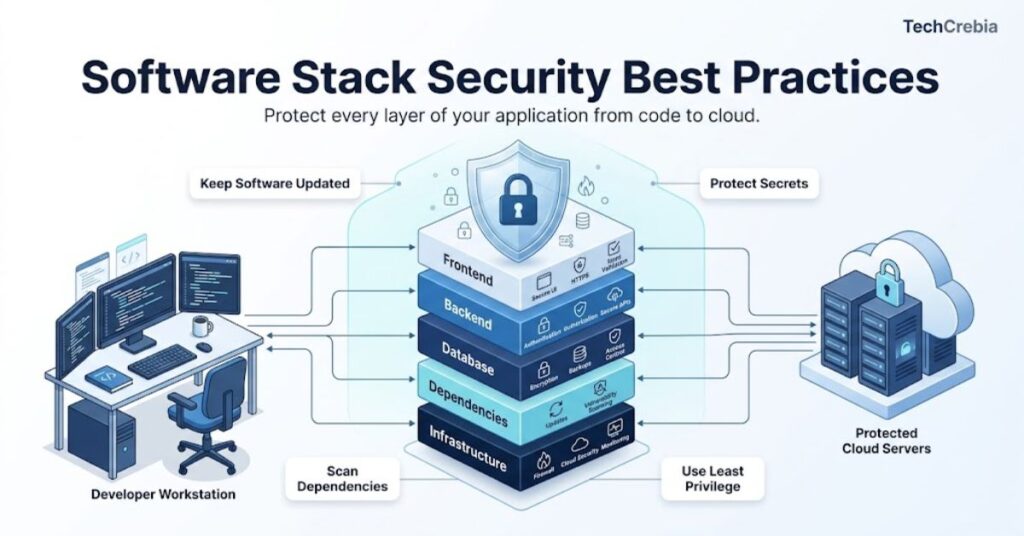
Security should remain part of stack selection from the beginning.
Do not wait until deployment to think about security.
Follow these practices:
- Keep frameworks and libraries updated.
- Remove unused dependencies.
- Protect API credentials.
- Use environment variables for secrets.
- Encrypt sensitive data.
- Apply least-privilege access.
- Scan dependencies for known vulnerabilities.
- Monitor application logs.
- Protect databases from public exposure.
- Back up important data regularly.
You should also separate development, testing, and production environments.
Never assume that a popular framework automatically makes an application secure. Developers still need secure configurations, access controls, testing, and monitoring.
Software Stack Troubleshooting
Problems can occur when different layers interact.
A website may load slowly because of the frontend, backend, database, network, or hosting environment.
Use a systematic troubleshooting process.
Start With the Application Layer
Check:
- Error messages
- Browser console
- Application logs
- API responses
- Recent code changes
Check the Backend
Look for:
- Failed API requests
- Authentication errors
- Runtime crashes
- Memory problems
- Incorrect environment variables
Check the Database
Investigate:
- Connection failures
- Slow queries
- Missing indexes
- Storage limits
- Authentication problems
Check Infrastructure
Review:
- Server resources
- Network connections
- Container status
- DNS configuration
- Load balancer health
- Cloud service status
Do not change several components at once. Test one layer at a time.
This approach makes the actual cause easier to identify.
Modern Trends in Software Stacks
Software stacks continue to evolve.
One major trend involves AI-assisted development. Developers increasingly use AI tools for code generation, debugging, documentation, and learning.
The 2025 Stack Overflow Developer Survey reports that GPT models had the highest usage among listed LLMs for development work, while developers also explored tools such as Claude and Gemini. (Stack Overflow Developer Survey)
Another major trend involves containers and cloud-native development.
Containers help teams package applications consistently. Developers can run frontend, backend, database, and supporting services in separate environments.
Serverless computing also remains useful for applications that need automatic infrastructure scaling.
Other important trends include:
- AI-native applications
- API-first development
- Cloud-native architecture
- Containers
- Infrastructure as code
- Automated CI/CD
- Edge computing
- Real-time applications
- Serverless services
- Observability and monitoring
Developers also increasingly combine traditional applications with AI services. For example, a web application might use React for its interface, Python for AI processing, PostgreSQL for structured data, and a vector database for semantic search.
Software Stack for Different Projects

There is no universal best stack.
Different projects need different combinations.
| Project Type | Suitable Stack Direction |
| Portfolio website | HTML, CSS, JavaScript |
| Business website | CMS or modern web framework |
| E-commerce | React/Next.js + backend + SQL database |
| SaaS application | React/Next.js + API + PostgreSQL |
| AI application | Python + AI framework + database |
| Enterprise platform | .NET/Java + SQL + cloud |
| Real-time application | Node.js or similar + WebSockets |
| Mobile backend | API + database + cloud services |
| Data application | Python + database + data tools |
The best choice depends on the application’s requirements rather than a single popularity ranking.
Key Takeaways
- A software stack combines technologies that work together to build and operate an application.
- Common layers include frontend, backend, database, runtime, APIs, and infrastructure.
- MERN, PERN, LAMP, and .NET represent common stack patterns.
- The best stack depends on project requirements, performance, security, scalability, budget, and team skills.
- Developers should avoid selecting technologies only because they appear trendy.
- Containers and cloud-native tools continue to influence modern application stacks.
- AI increasingly forms part of modern development environments and application architectures.
- Good documentation, testing, security, and monitoring matter as much as technology selection.
Conclusion
A software stack provides the technical foundation for an application. It brings programming languages, frameworks, databases, infrastructure, and development tools together so they can perform different jobs as one system.
You do not need the most complicated stack to build a successful application. You need the right stack for your specific requirements.
A small website may need only a few technologies. A global SaaS platform may need multiple services, databases, containers, cloud infrastructure, monitoring systems, and automated deployment.
The best approach starts with the problem. Define what the application needs, understand your users, evaluate your team’s skills, consider security and scalability, and then select technologies that support those goals.
As AI, cloud computing, containers, and automation continue to evolve, software stacks will also change. Developers who understand the fundamentals can adapt to those changes without chasing every new technology.
FAQs
What is a software stack?
A software stack is a collection of technologies that work together to build, run, and maintain an application.
What are the main parts of a software stack?
The main parts usually include the frontend, backend, database, runtime, APIs, and infrastructure.
What is a common software stack?
MERN, PERN, LAMP, and .NET represent common software stack combinations.
Is a software stack the same as a technology stack?
People often use both terms to describe the technologies used to build and operate an application.
How do I choose a software stack?
Choose technologies based on project requirements, performance, security, scalability, budget, and developer skills.
Why do developers use different stacks?
Different projects have different requirements, so one stack cannot provide the best solution for every application.
Can a software stack include AI?
Yes. Modern applications can include AI models, AI APIs, vector databases, and AI development tools as part of their stack.
Is a bigger software stack better?
No. An unnecessarily large stack can increase complexity, maintenance work, and security risks.
What is a full-stack developer?
A full-stack developer works across major application layers, usually including frontend and backend development and sometimes databases and deployment.
Does a software stack affect application performance?
Yes. Technology choices can affect processing speed, database performance, network efficiency, scalability, and overall user experience.
10 SEO Tags
- software stack
- software stack meaning
- technology stack
- software stack examples
- software development stack
- web development stack
- full stack development
- software architecture
- modern software development
- technology stack examples
5 Internal Linking Suggestions With Anchor Text
- Difference Between Software and Hardware — use when explaining how software interacts with physical computer components. Difference Between Software and Hardware
- Productivity Software Guide — use when discussing software categories and practical business tools. Productivity Software Guide
- Samsung J7 Software Update Guide — use for an example of device software and update management. Samsung J7 Software Update Guide
- Fan Controller RGB Software — use when discussing software that controls hardware components. Fan Controller RGB Software
- Software and Hardware Differences — use as an additional contextual link for beginners learning software fundamentals. Difference Between Software and Hardware Explained
2 Authoritative External References
- Microsoft Learn — Common Web Application Architectures
- Docker Docs — Build and Share a Containerized Application
Social Media Title
Software Stack Explained: Layers, Examples & 2026 Guide