

Quick Answer
Software design patterns are reusable approaches that help developers solve common software design problems.
They provide proven ways to organize code, create objects, connect components, and manage communication between different parts of an application.
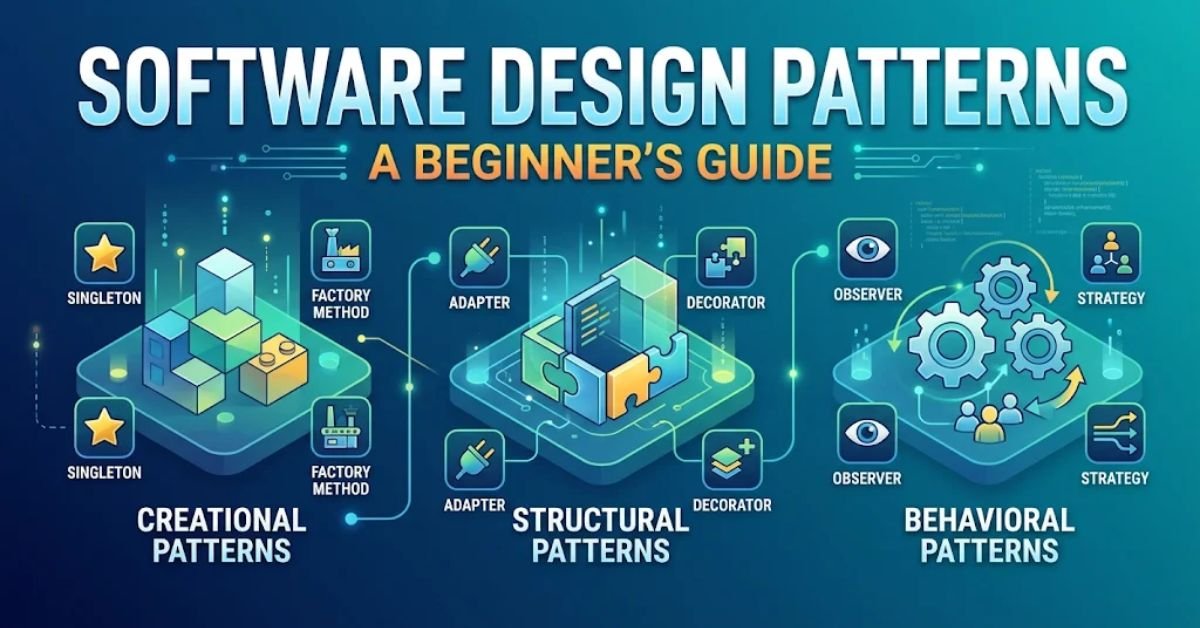
Design patterns fall into three primary groups: creational, structural, and behavioral. Developers use them to make software easier to understand, extend, test, and maintain.
Introduction
Building software involves more than writing code that works. Developers must also decide how different components should communicate, where they should store information, and how they can manage future changes.
A small application may need only a few classes and functions. However, a larger project can contain hundreds of components. Without a clear structure, developers may create repeated code, complicated relationships, and difficult maintenance problems.
This is where software design patterns become useful. They offer established approaches to common programming challenges and help developers make better design decisions.
For example, imagine an online shopping website that supports several payment methods. Instead of placing every payment operation inside one large class, a developer can use a suitable design pattern to separate payment responsibilities.
This makes the application easier to expand when the business introduces another payment option.
In this TechCrebia guide, you will learn what software design patterns mean, how they work, their main categories, common examples, practical benefits, and situations where developers should avoid unnecessary patterns.
What Are Software Design Patterns?
Software design patterns are reusable design approaches that help developers solve recurring problems in software development. They describe how different classes, objects, and components can work together to achieve a particular result.
A design pattern does not provide a complete application or ready-made source code. Instead, it gives developers a general structure that they can adapt to their project.
Think about a common problem in an online store. Customers may want to pay through credit cards, digital wallets, or bank transfers. Each payment method follows different steps, but the application still needs one organized way to process payments.
A suitable design pattern can help developers separate payment methods while allowing the main application to communicate with them through a consistent interface.
The concept became widely known through the 1994 book Design Patterns: Elements of Reusable Object-Oriented Software, written by Erich Gamma, Richard Helm, Ralph Johnson, and John Vlissides. Developers commonly call these authors the Gang of Four, or GoF.
Their book introduced 23 classic patterns. These patterns established a shared vocabulary for discussing common software design problems.
textbooks.cs.ksu.edu+1
Why Are Software Design Patterns Important?
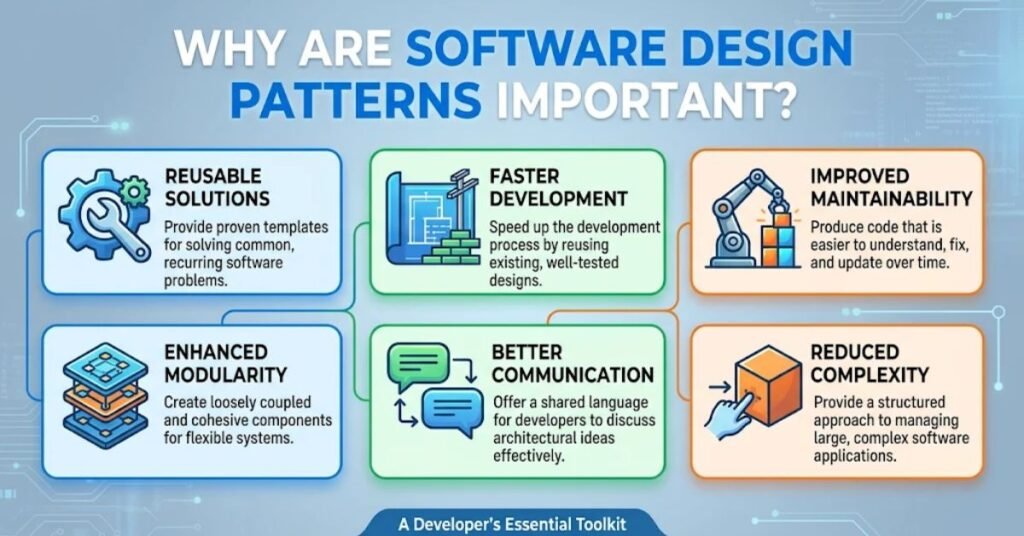
Software design patterns help developers organize complicated applications and make future changes easier. They provide familiar approaches that reduce the need to solve the same design problem from scratch each time.
Consider a growing business application. It may start with customer registration and basic account management. Later, the company may introduce payment processing, notifications, order tracking, and reporting.Harvard – Software Design Principles
If developers place every feature inside a few large classes, the application can become difficult to update. A change in one area may also affect unrelated features.
Software design patterns help reduce this problem by separating responsibilities and defining how components interact.
They also improve communication between developers. When a programmer mentions the Factory Method pattern, experienced team members can grasp the general approach without needing to discuss every implementation detail.
Harvard’s Kempner Institute Computing Handbook explains that patterns provide shared design vocabulary and help developers keep code flexible as projects grow.
Kempner Institute Computing Handbook
Good design patterns also support testing because developers can isolate components and examine their behavior more easily.
However, patterns do not automatically guarantee better software. Developers must select an approach that matches the actual problem.
What Are the Three Main Types of Software Design Patterns?
The three traditional categories of software design patterns are creational, structural, and behavioral. Each category focuses on a different part of application design.
Creational patterns deal with object creation. Structural patterns organize relationships between classes and objects. Behavioral patterns explain how different components communicate and share responsibilities.
The Gang of Four introduced these three categories in its classic collection of 23 patterns. Each group contains several approaches that solve different development problems.
textbooks.cs.ksu.edu
| Pattern category | Main purpose | Common examples |
| Creational | Manage object creation | Factory Method, Builder, Singleton |
| Structural | Organize components | Adapter, Decorator, Facade |
| Behavioral | Manage communication | Observer, Strategy, Command |
These categories give beginners a useful starting point. They also help developers understand why one pattern may work better than another.
For example, a developer who needs to create objects based on user selections may explore a creational pattern. Someone connecting two incompatible systems may need a structural pattern.
A notification system that informs several components about an event may benefit from a behavioral pattern.
Understanding these differences makes it easier to recognize software design patterns in real projects.
What Are Creational Design Patterns?
Creational design patterns focus on how applications create and manage objects. They help developers control object creation without placing construction logic throughout the entire program.
In a simple application, a programmer can create an object directly. However, a larger system may need different objects depending on user choices, application settings, or available services.
Imagine a document application that creates PDF, Word, and text files. The application needs to select the correct document object based on the user’s choice.
A creational pattern can separate this decision from the main application logic.
The five classic GoF creational patterns are Abstract Factory, Builder, Factory Method, Prototype, and Singleton. Each one handles object creation in a different way.
These patterns can reduce repeated construction code and make applications easier to extend. However, developers should avoid adding complicated creation systems when a simple constructor already solves the problem.
Factory Method Pattern
The Factory Method pattern provides a structured way to create objects without requiring the main application to know the exact class being created.
For example, imagine a notification application that supports email and SMS messages. The program needs to select a suitable notification object based on the user’s settings.
Instead of creating each notification type directly throughout the application, a factory method can handle the selection.
The main application then works with a common notification interface. It does not need to understand every internal detail of each notification class.
This approach becomes useful when an application supports several related object types or expects new types in the future.
For example, a company might introduce push notifications after launching email and SMS support. Developers can add another implementation without changing every part of the application.
However, Factory Method may add unnecessary classes to a small program. Developers should use it when object creation involves real variation or needs to remain flexible.
Singleton Pattern
The Singleton pattern controls object creation so that a class provides one shared instance within a defined application context.
For example, an application may use a shared configuration service to access common settings. Several components can use the same service instead of creating separate configuration objects.
This can help keep shared information consistent.
However, Singleton requires careful planning. Global shared state can make testing difficult because several components may depend on the same object.
Developers must also consider threads, application processes, and deployment environments. A Singleton in one process does not automatically create one instance across every server or computer.
For this reason, programmers should not use Singleton simply because they want to avoid creating objects.
A dependency injection system or another controlled object-management approach may offer a better solution.
Builder Pattern
The Builder pattern helps developers create complex objects step by step. It separates the construction process from the final object.
Consider an application that creates customized computer orders. Each order may contain a processor, memory, storage, graphics card, and operating system.
Some customers may select basic components, while others may choose advanced options.
A Builder can collect these selections and construct the final configuration in an organized way.
This approach is useful when an object contains many optional settings or requires several construction steps.
It can also make code easier to read because developers can understand how the final object takes shape.
However, a Builder is unnecessary when an object only needs one or two simple values.
What Are Structural Design Patterns?
Structural design patterns explain how developers organize classes and objects into larger structures. They help components work together without creating unnecessary dependencies.
A growing application often uses external services, libraries, databases, and internal modules. These components may follow different interfaces or require additional functionality.
Structural patterns provide ways to connect them.
For example, a business application may use one service for customer records and another for payment processing. The two systems may follow different communication formats.
A structural pattern can help developers connect them without rewriting both systems.
The seven classic GoF structural patterns include Adapter, Bridge, Composite, Decorator, Facade, Flyweight, and Proxy.
These approaches can make software more flexible and easier to extend. They also help developers manage complex relationships between components.
The right pattern depends on the structure of the problem. Developers should understand what needs to connect or change before choosing a particular solution.
Adapter Pattern
The Adapter pattern helps two incompatible components communicate. It works like a converter that changes one interface into another that a different component can understand.
Imagine an application that uses a new payment service but still needs to support an older system. The older system may expect a different request format.
An Adapter can translate the requests between these components.
The application can then communicate with both systems through a consistent interface.
This pattern is especially useful when developers integrate external libraries, older applications, or third-party services.
For example, a company may connect its existing customer management software with a new reporting tool. An Adapter can help translate the information between the two systems.
The main advantage is that developers do not need to redesign the original components.
However, too many adapters can make a system harder to understand. Each adapter should solve a clear compatibility problem.
Decorator Pattern
The Decorator pattern adds new functionality to an existing object without changing its original structure.
Imagine a document application that supports basic text editing. Users may also want spell checking, formatting tools, and export options.
Instead of creating a separate class for every possible combination, developers can use decorators to add selected features around the original component.
A decorator receives an object, adds additional behavior, and continues to provide the expected interface.
This makes it easier to extend functionality without creating long inheritance chains.
The same idea can appear in logging systems, user interface components, and data-processing applications.
However, developers should keep decorator layers understandable. Too many wrappers can make it difficult to trace how an operation moves through the application.
Facade Pattern
The Facade pattern provides a simple interface to a complicated group of components.
Consider an online shopping application. Completing an order may require inventory checks, payment processing, shipping arrangements, and customer notifications.
If the main application communicates directly with every internal service, its code may become complicated.
A Facade can provide one simple operation, such as placing an order, while coordinating the necessary components behind the scenes.
This reduces the amount of internal detail that other parts of the application need to understand.
Facade is useful when a system contains several related services or complex operations.
However, developers should avoid turning the Facade into an oversized component that handles every business responsibility.
What Are Behavioral Design Patterns?
Behavioral design patterns focus on communication and responsibility between objects. They help developers control how components exchange information, respond to events, and perform related operations.
A modern application often contains components that need to work together. A shopping website, for example, may update order information, notify customers, and change inventory records after a purchase.
Without a clear communication structure, these components may become tightly connected.
Behavioral patterns help manage these interactions.
The 11 classic GoF behavioral patterns include Chain of Responsibility, Command, Interpreter, Iterator, Mediator, Memento, Observer, State, Strategy, Template Method, and Visitor.
Each pattern addresses a different communication or behavior problem.
For example, Observer is useful when several components need to receive updates about one event. Strategy helps applications switch between different algorithms without changing the code that uses them.
Developers should select patterns according to how objects need to communicate. A simple function call may be enough for a small operation.
Observer Pattern
The Observer pattern allows several objects to receive notifications when another object changes its state.
Imagine a news application where users subscribe to updates about particular topics. When a new article appears, the application can notify interested subscribers.
The main news component does not need to know every detail of how each subscriber receives the update.
Instead, subscribers register themselves and receive notifications when the relevant event occurs.
This approach is useful in event-driven applications, notification systems, dashboards, and user interfaces.
For example, a shopping application may update its order status and notify the customer interface when a payment succeeds.
Observer helps separate the component that produces an event from the components that respond to it.
However, developers should manage subscriptions carefully. Unnecessary listeners or forgotten subscriptions can cause performance problems and unexpected behavior.
Strategy Pattern
The Strategy pattern allows developers to select between different ways of performing the same task.
Consider a delivery application that offers standard, express, and overnight shipping. Each delivery option follows different pricing and processing rules.
Instead of placing all these rules inside one large conditional statement, developers can create separate strategies.
The application selects the required strategy according to the customer’s choice.
This makes the code easier to extend. A company can introduce another delivery method without rewriting the complete checkout process.
Strategy also works well for discount calculations, payment rules, sorting methods, and other operations that need interchangeable behavior.
Its main advantage is flexibility. Developers can change the selected behavior without changing the component that uses it.
However, a Strategy implementation may introduce extra classes. It works best when the application genuinely needs several interchangeable approaches.
Command Pattern
The Command pattern represents an action as a separate object. It separates the request from the component that operates.
Think about a text editor. Users may save a document, undo an edit, redo an action, or copy selected text.
A command object can represent each operation. The application can then manage these actions through a common structure.
This approach is useful when software needs undo and redo functions, task queues, scheduled operations, or action logging.
For example, a drawing application can store user actions so that it can reverse the most recent operation.
Command also makes it easier to place actions in a queue and process them later.
However, creating separate command objects for very simple operations can increase code complexity. Developers should use this pattern when action management provides a clear benefit.
What Is the Difference Between Design Patterns and Software Architecture?
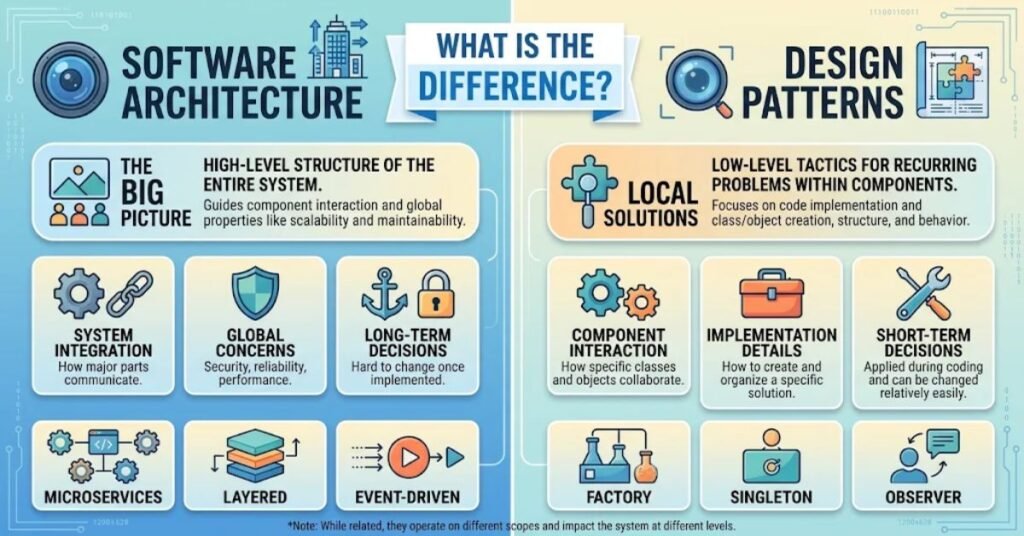
Software design patterns solve smaller, recurring design problems, while software architecture describes the broader structure of an entire application or system.
For example, an application may follow a layered architecture that separates its user interface, business logic, and data access responsibilities.
Within that architecture, developers may use Factory Method to create objects or Observer to manage notifications.
The two concepts work together, but they serve different purposes.
| Comparison | Design patterns | Software architecture |
| Main focus | Specific design problems | Overall system structure |
| Scope | Usually smaller | Usually broader |
| Purpose | Organize components and behavior | Define major system components |
| Example | Adapter, Observer, Factory | Layered, microservices, event-driven |
| Main users | Software developers | Architects and development teams |
Understanding this difference helps beginners avoid using the terms interchangeably.
Design patterns can support a larger architecture, but one pattern does not define the complete structure of an application.
You can explore TechCrebia’s software stack guide to understand how different technologies and application layers work together.
How Do Developers Choose the Right Software Design Patterns?
Developers should choose software design patterns after understanding the actual problem, the application’s requirements, and the expected changes.
A pattern should make a design easier to manage. It should not become an extra layer that creates more work without providing a useful advantage.
Consider an application that needs to support several payment providers. The development team can first examine how each provider handles transactions and what their interfaces have in common.
If the application needs interchangeable payment implementations, a suitable pattern may help separate these responsibilities.
However, a simple application with one payment method may not need that additional structure.
Developers should also consider the programming language, existing architecture, team experience, and testing requirements.
The Object-Oriented Programming Concepts guide on TechCrebia explains classes, objects, inheritance, encapsulation, and polymorphism. These concepts provide a useful foundation for understanding many classic design patterns.
The best choice is usually the simplest structure that solves the current problem and supports realistic future requirements.
What Are the Benefits of Using Software Design Patterns?
Software design patterns provide several benefits when developers apply them to suitable problems. They can improve code organization, reduce repeated work, support testing, and make applications easier to extend.
One major advantage is reusability. Developers can apply a familiar design approach to similar problems instead of creating a completely new structure every time.
Another benefit is maintainability. When components have clear responsibilities, developers can update one part of an application without unnecessarily changing unrelated features.
Design patterns also improve teamwork. Developers can discuss familiar approaches using shared names. This helps technical teams understand how an application works and why a particular structure exists.
Testing can become easier as well. For example, Strategy allows developers to test different algorithms separately, while Adapter can isolate communication with an external service.
These advantages can support the wider development process. TechCrebia’s software development life cycle guide explains how planning, design, coding, testing, deployment, and maintenance fit together.
However, these benefits depend on good implementation. A badly selected pattern can increase complexity rather than reduce it.
What Are the Disadvantages of Software Design Patterns?
Software design patterns are useful, but they also have limitations. Developers can create unnecessary complexity when they apply patterns without understanding the problem.
One common disadvantage is additional code. Some patterns require extra classes, interfaces, and relationships. A small application may not need these structures.
Another issue is overengineering. Developers sometimes prepare software for possible future requirements that may never happen. This can make the current application harder to understand.
Patterns can also become difficult to maintain when developers combine too many approaches. For example, excessive decorators, factories, and abstract layers may make it harder to follow a simple operation.
Beginners may also misuse patterns because they memorize definitions instead of understanding their purpose.
A pattern does not automatically improve application performance, security, or reliability. Developers must still write correct code, perform testing, and review possible risks.
The best approach is to start with a clear problem, compare simple solutions, and introduce a design pattern only when it provides a practical improvement.
Common Mistakes Beginners Make With Software Design Patterns
Beginners often struggle with software design patterns because they focus too much on learning names and definitions. Understanding when and why to use a pattern matters more than memorizing every available example.
One common mistake is using Singleton for every shared service. Although a shared instance may seem convenient, it can create hidden dependencies and make automated testing harder.
Another mistake is choosing inheritance when composition would provide a simpler relationship. Developers should not build complicated class hierarchies simply to reuse a few methods.
Some beginners also confuse design patterns with programming frameworks. A framework provides tools and structures for building applications, while a design pattern describes a general approach to solving a recurring design problem.
Ignoring project requirements creates another problem. A developer may use Observer because it is familiar, even when a simple function call would be easier.
Developers should also avoid copying pattern examples without understanding their limitations. A pattern that works well in one application may not suit another.
The best way to learn is to build small projects, examine the problems they create, and test different design approaches.
A Beginner’s Guide to Learning Software Design Patterns
Learning software design patterns becomes easier when you understand basic programming concepts first. You do not need to memorize all 23 classic patterns before starting practical development.
Begin by learning classes, objects, interfaces, inheritance, composition, and methods. These concepts help explain how many object-oriented patterns work.
Next, study a few common patterns. Factory Method, Singleton, Builder, Adapter, Observer, and Strategy are good patterns for beginners to explore because each one solves a different software development challenge.
Try implementing each pattern in a small project. For example, create a notification application that supports email and SMS messages. Then explore how Factory Method can organize object creation.
You can also build a simple delivery calculator with different shipping methods to understand Strategy.
After completing these exercises, compare the patterned version with a simpler implementation. Notice how the code changes, how many additional components appear, and whether the design becomes easier to maintain.
For a structured learning path, explore software development methodologies and learn how development teams organize their work.
Practice and comparison will help you understand patterns more effectively than memorizing definitions.
Real-World Applications of Software Design Patterns
Software design patterns appear in many types of applications, including websites, mobile apps, business platforms, games, and enterprise systems.
An e-commerce platform may use Strategy to calculate different delivery charges. It may use Observer to update order notifications when payment or shipping information changes.
A document editor can apply the Command pattern to handle actions such as undoing and redoing changes. It can also use Decorator to add optional features around existing editing components.
Mobile applications can use Observer-style event handling to update screens when data changes. Developers may also use Adapter to connect external services that follow different interfaces.
Enterprise applications often contain many services and business rules. Patterns such as Facade and Factory Method can help organize these systems and separate responsibilities.
The exact implementation depends on the programming language and framework. Java, Python, C#, C++, and JavaScript offer different ways to express these design ideas.
For developers working on large projects, understanding software maintenance types can also help explain why clear code structure matters after an application reaches users.
These examples show that software design patterns are practical development tools rather than simply theoretical programming concepts.
Design Principles vs. Design Patterns
Design patterns and design principles are related, but they do not mean the same thing.
Software principles help developers make effective design choices, whereas design patterns offer proven solutions to common programming challenges.
For example, the Single Responsibility Principle encourages developers to give each component a clear responsibility.
The Strategy pattern provides one way to organize interchangeable behaviors. Developers can use the principle when deciding whether the pattern fits their application.
Other important principles include loose coupling, high cohesion, separation of concerns, and programming to interfaces.
These principles help developers evaluate a design before choosing a pattern.
The Harvard Kempner Institute Computing Handbook discusses design principles and patterns as useful guides for keeping software understandable, testable, and easier to change.
Kempner Institute Computing Handbook
A practical developer should understand both concepts. Principles help identify good design qualities, while patterns offer possible structures for achieving them.
Neither one should replace careful analysis of project requirements.
Best Practices for Applying Software Design Patterns
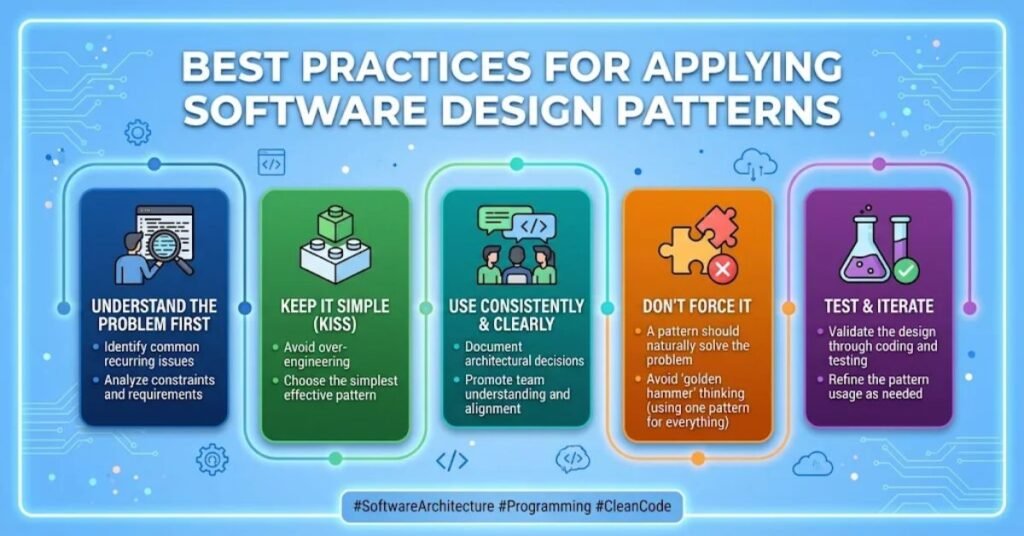
Effective software design patterns begin with a thorough understanding of the problem being addressed.
Developers should identify what needs to change, which components need to communicate, and what responsibilities each component should handle.
They should also keep implementations simple. Adding unnecessary interfaces or classes can make a small feature harder to understand.
Consistent naming helps other developers recognize the purpose of each component. A class named PaymentFactory is easier to understand when it creates payment-related objects rather than performing unrelated business operations.
Testing is another important practice. Developers should check normal behavior, unusual inputs, error conditions, and interactions between components.
Documentation can explain why a team selected a particular pattern and what limitations it introduces.
Teams should also review their designs as project requirements change. A pattern that once solved a problem may become unnecessary after an application evolves.
Finally, developers should compare the patterned solution with a simpler alternative. If the pattern does not improve flexibility, readability, or maintainability, the simpler design may be the better choice.
FAQ
What are software design patterns?
Software design patterns provide proven approaches for handling recurring challenges in software development.Popular examples are Factory Method, Singleton, Adapter, Observer, and Strategy.
Which three categories form the foundation of design patterns?
Design patterns are divided into three core types: creational, structural, and behavioral.
How many design patterns are there?
The classic Gang of Four book introduced 23 design patterns in 1994. Many additional patterns have emerged since then.
Which software design patterns should beginners learn first?
Beginners should start with Factory Method, Singleton, Builder, Adapter, Observer, and Strategy to understand common design techniques.
Are software design patterns necessary for every application?
No. Patterns are useful when they solve specific problems or improve code organization. Unnecessary patterns can make applications more complex.
Conclusion
Software design patterns give developers practical ways to solve recurring problems and organize application components. They provide shared approaches that make software easier to understand, extend, test, and maintain.
The three main categories cover different areas of development. Creational patterns manage object creation, structural patterns organize components, and behavioral patterns explain how objects communicate.
Factory Method, Singleton, Builder, Adapter, Decorator, Facade, Observer, Strategy, and Command are useful examples for beginners to study.
However, developers should not apply every pattern to every project. A simple design is often better when it solves the problem clearly.
For beginners, the best approach is to understand programming fundamentals, practice common patterns, and compare different solutions through real projects.
At TechCrebia, the goal is to make software engineering topics easier to understand. Learning software design patterns is a useful step toward building cleaner and more maintainable applications.